


As part of training, I have been learning SQL and how it is used to work with data stored in relational databases. Although I had come across SQL before, I was still very new to it, and this was my first time properly understanding how it works rather than just recognising the syntax.
Learning SQL has helped me better understand what happens to data before it reaches visualisation tools. It also highlighted how important data structure and logic are when querying information, particularly when working with larger or more complex datasets.
What is SQL?
SQL, or Structured Query Language, is a language used to retrieve and manipulate data stored in databases. Rather than working with flat files, SQL allows you to query specific tables, filter rows, group data, and combine multiple tables together. This makes it especially useful when working with large volumes of structured data.
Using SQL encourages a more deliberate way of thinking about data. Before writing a query, you need to be clear about what you are trying to answer, what data you need, and how that data should be filtered or summarised. This becomes increasingly important as queries grow in complexity.
The order of a SQL query statement
When writing SQL, queries follow a clear and consistent structure. Understanding this order makes queries easier to read, write, and debug.
A basic SQL query is written in the following order:
SELECT
FROM
WHERE
GROUP BY
HAVING
ORDER BY
Each clause adds another layer to the query. You start by selecting the fields you want to see, define where the data comes from, apply any filters, group and filter aggregated results if needed, and finally control how the output is ordered. Getting comfortable with this structure made SQL feel far more predictable to work with.
Introducing subqueries and CTEs
After learning how SQL queries are structured, we were introduced to subqueries and common table expressions (CTEs). They were introduced early to show how SQL logic can be structured clearly as queries start to grow, rather than trying to handle everything in a single statement.
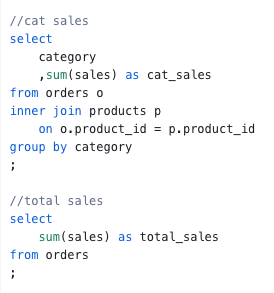
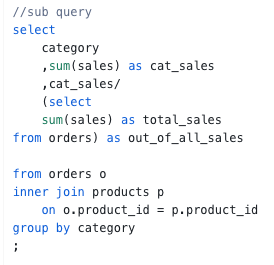
To briefly illustrate the difference, the examples below calculate total sales by category and compare them to overall sales.
In the subquery version, the total sales calculation is nested directly inside the main query. While this works, the logic becomes harder to follow as more calculations are added.
In the CTE version, total sales are calculated once at the top of the query and then referenced in the main query. This structure makes the logic easier to read and reason about, especially as queries become more complex.
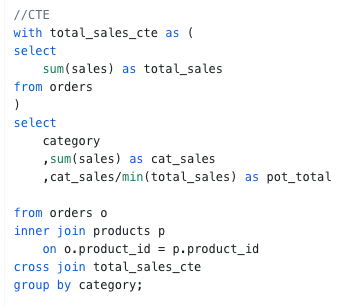
At this stage, the key takeaway is simply understanding how both approaches work and why CTEs are often preferred for readability.
Reflection
Overall, SQL is a powerful but approachable tool once you take the time to understand how it is structured. At this stage, SQL still feels like a lot, but it is starting to make sense. Once you slow down and read queries in plain English, the structure and keywords are fairly intuitive, and it becomes more about understanding the logic than memorising syntax. It is still early days, but SQL feels logical rather than overwhelming, and I am enjoying learning it so far. With more practice, I can see it becoming a useful foundation alongside tools like Tableau and Alteryx.