


Git is the world's most popular distributed version control system. Since its release in 2005, it has become a pillar of data and software engineering best practices.
While its ability to track code versions initially attracted developers, its enduring popularity is attributed to how it enables teams to collaborate on a shared code base seamlessly.
This article provides an overview of a typical Git workflow between a remote and local repository (repo). Developers constantly move between these two environments when working on shared code in a way that. The workflow allows development teams to work on the same code in a way that retains it's integrity.
Let’s start by defining the difference between the two:
- Remote: An agreed-upon central location for the code base, typically hosted by services like GitHub or GitLab. This usually acts as the "Single Source of Truth" and holds the main branch.
- Local: A copy of the repository located on a developer's specific machine. It is copied (or ‘cloned’) from the remote repository. A developer will typically create a dedicated development branch here before making any changes.
A diagram of the workflow below outlines the lifecycle of a code change:
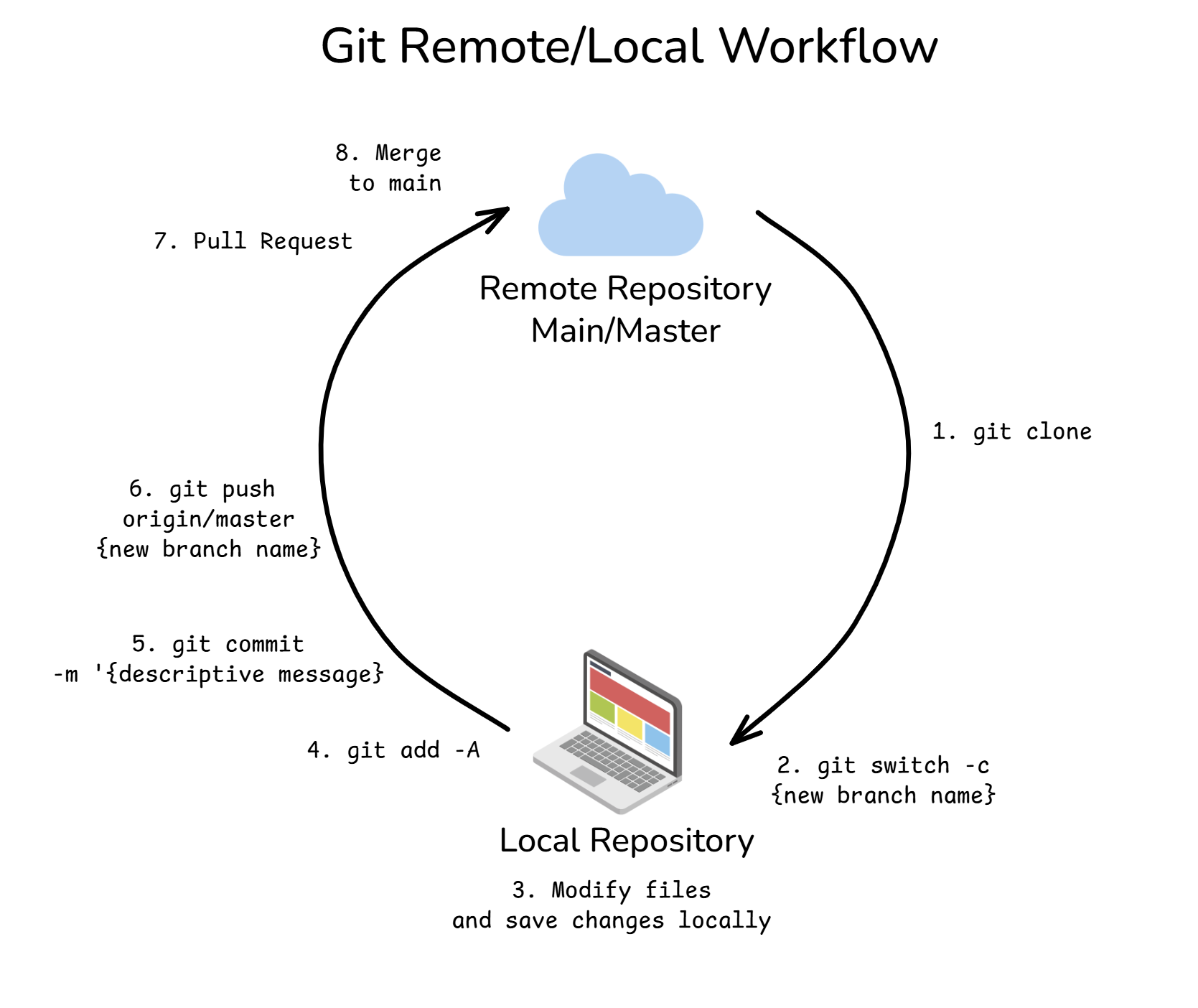
- 1.
git clone– The developer clones (copies) all files and history from the remote repo onto their local machine. - 2.
git switch -c <branch-name>– Instead of working directly on the main branch, the developer creates and switches to a new "feature branch" to make their changes safely. - 3. Modify and Save Changes – The developer works on the files and saves them locally. Note: Saving a file in your editor does not save it to Git, nor does it create a snapshot of the version history yet.
- 4.
git add -A– This moves your all of your saved changes to the "Staging Area," indicating which files you intend to include in the next snapshot. - 5.
git commit -m {descriptive message}– This takes the files from the staging area and captures a permanent snapshot of them in the version history. - 6.
git push origin/master {new branch name– This uploads the commits (snapshots) from the local feature branch to the remote repository. - 7. Pull Request (PR) – Once the changes are pushed to the remote repo, the developer opens a Pull Request (often via the GitHub/GitLab interface). This proposes merging the new feature branch into the main branch. In data teams, PRs provide a vital opportunity for code review and discussion to ensure the changes are safe.
- 8. Merge – If the Pull Request is approved, the commits are merged into the main branch. The code base is updated, and the change history is permanently recorded.
There is a lot more nuance to Git commands and the workflow itself, but hopefully, this gives you a useful overview of the core concepts!