


What is RegEx and Why do we use it?
Regular Expressions, often referred to as RegEx is a sequence of characters that specifies a search pattern in a string that is particularly used for finding, removing or replacing parts of string.
It’s essentially a metalanguage - a way about talking about text - that allows us to speak more generally, i.e. we can mention character types (known as qualifiers) and how many of them (known as quantifiers) so we don't have to specify the exact characters we are looking for.
Regex is not just versatile but is also universal, as it is used in all main program languages such as Alteryx, Tableau and text editors - although the syntax might be slightly different across programs. To work efficiently with RegEx, it's all about reaching the perfect balance - you must ensure you're vague enough to capture everything you want but also specific enough to only capture what you want - a top tip is to build up an expression in stages, testing and adjusting as you go.
RegEx Qualifiers - What Are They?
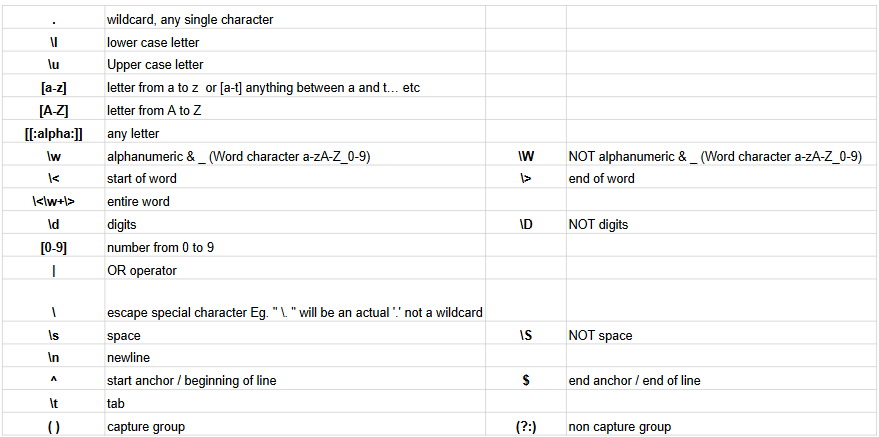
Since RegEx identifies a wide range of characters, including the ones we don't see such as space, tab, new lines etc, we can use qualifiers to specify the text we are looking for using an expression. The list of qualifiers can be seen below:
RegEx Qunatifiers - What Are They?
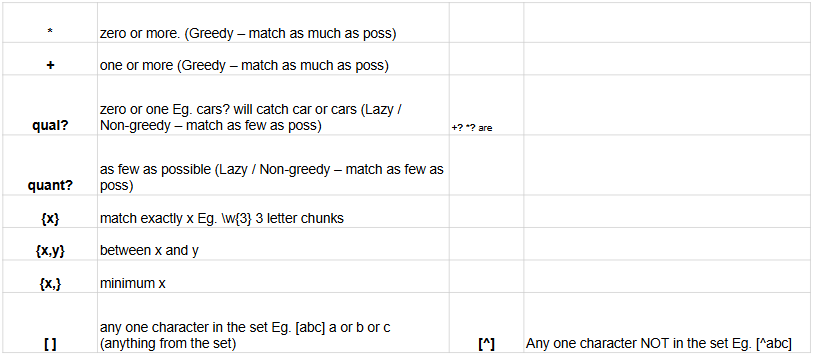
Quantifiers are how we communicate how many of each character we would like to find. The list of quantifiers can be seen below:
RegEx in Alteryx Option 1 - Formula Tool
In the formula tool in Alteryx, there are three RegEx functions we can use:
- REGEX_CountMatches(String, Pattern) - this function searches the specified string (field) in the formula for the specified pattern and counts how many times this appears - this will then output a number.
- REGEX_Replace(String, Pattern, Replace) - this function searches the specified string (field) in the formula for the specified pattern and replaces it. This then outputs the string with the replaced values.
- REGEX_Matches(String, Pattern) - this function searches for whether the specified pattern is contained in the specified string/field. The output is a boolean.
RegEx in Alteryx Option 2 - RegEx Tool
Alteryx also has a RegEx tool specifically for applying RegEx functions.
The RegEx tool can be deemed more powerful than the RegEx formulas from the formula tool in that although you can replace parts of a string with a pattern, and check to see if a specified pattern can be found in a string (match), you can also tokenize and parse a string with the RegEx tool.
- Tokenize - relatively similar to a text to columns tool. This will search a string for every occurrence of a pattern or expression you have specified and split these into columns
- Parse - this allows you to extract a particular expression from a string.