


If you're familiar with the Formula tool in Alteryx, you know that it is key for transforming data, by either updating an existing field or creating a new one. However, more specialised tools are sometimes needed when transforming multiple columns at once or performing calculations that rely on relationships between rows - this is where the Multi-Field and Multi-Row Formula tools become particularly useful. In this blog, we’ll focus on the Multi-Field Formula tool, so keep an eye out for my next blog covering the Multi-Row Formula tool!
What does the Multi-Field Formula tool do?

This tool allows you to apply the same formula to multiple columns at once.
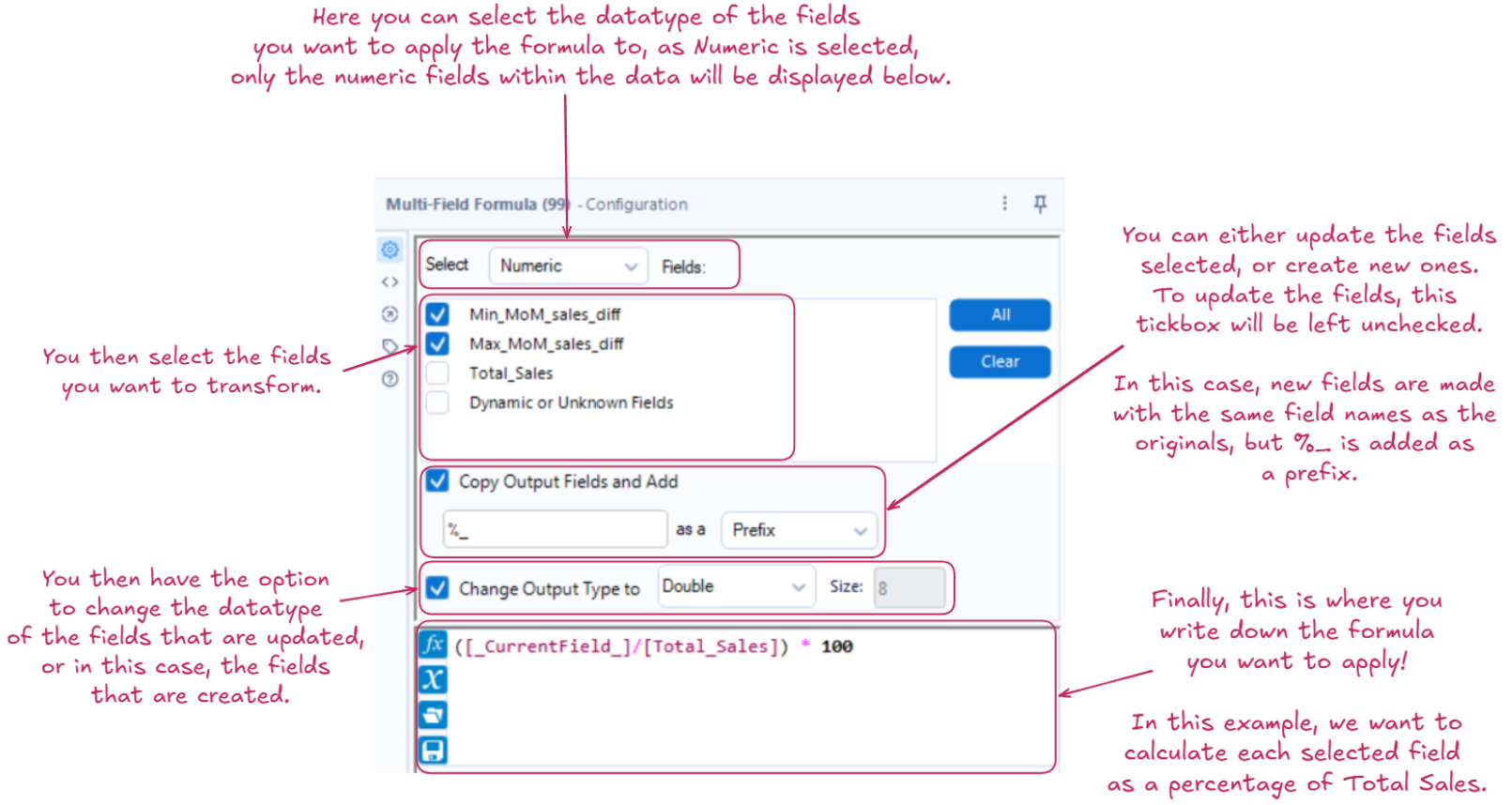
The important thing to remember when writing the formula is that [_CurrentField_] is used to represent the field currently being processed by the tool.
The Configuration:
Why should you use it?
The two main benefits that come from the Multi-Field Formula tool are reduced repetition and increased efficiency in our workflow. It removes the need to rewrite the same formula for several fields by applying the transformation to all selected fields in one go, which in the long run can save a lot of time and reduce the potential for errors. As a result, only one formula needs to be updated to change the the type of transformation being applied, making it easy to maintain and modify.