


In my previous blog, we covered the Multi-Field Formula tool (check it out here!). This time we’ll be reviewing the Multi-Row Formula tool, which also expands on the capabilities of the standard Formula tool, but works across rows rather than columns.
What does the Multi-Row Formula tool do?

This tool allows you to perform calculations that depend on values from other rows.
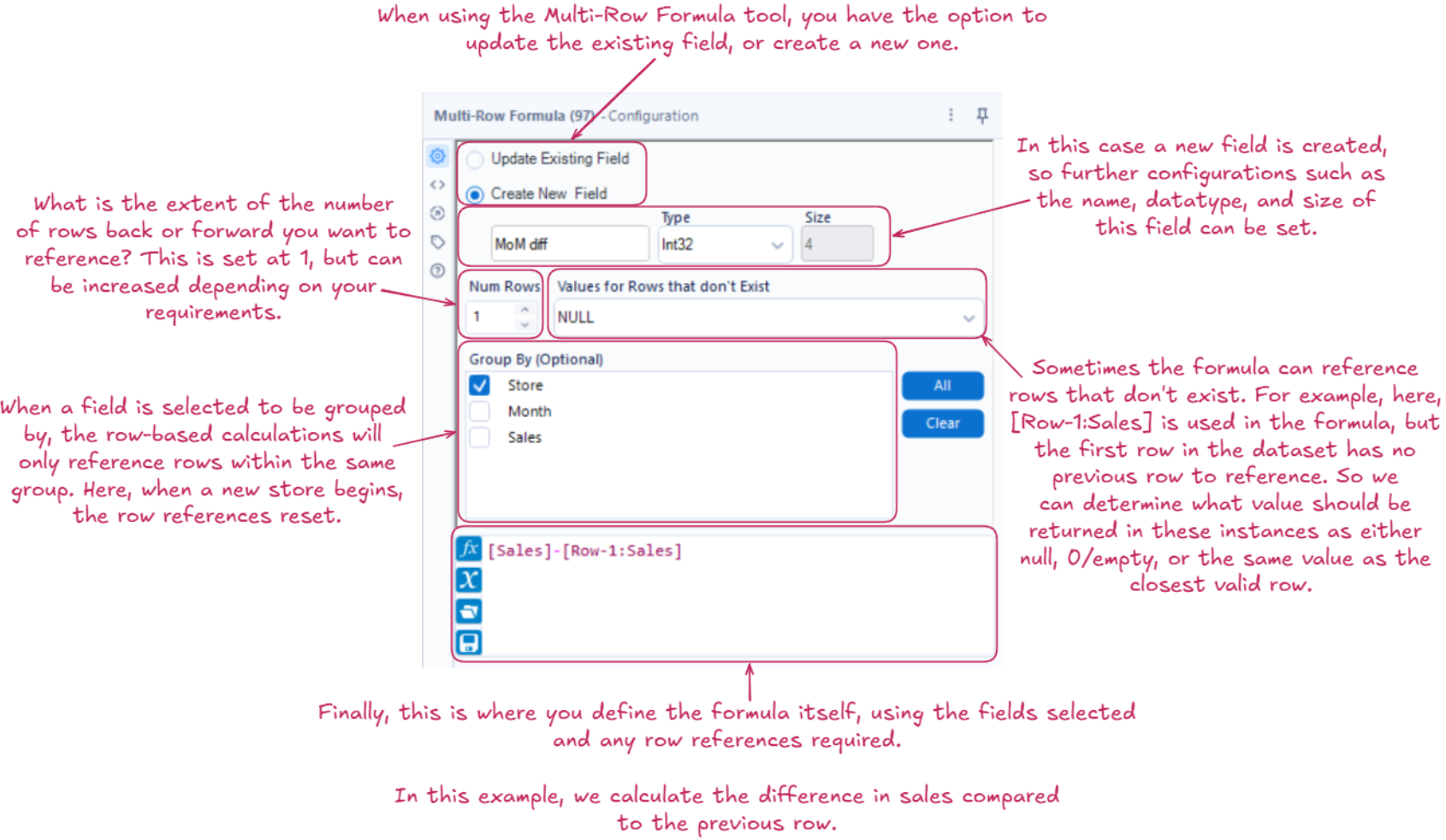
Within the formula, [Field_Name] references the current row, [Row-1:Field_Name] references 1 row before the current row and [Row+1:Field_Name] references 1 row after the current row. The value ‘1’ can be replaced to reference rows further before or after the current one.
The Configuration:
Why should you use it?
As the Multi-Row Formula tool allows you to use row-level data within the calculation being applied, it supports row-based analysis. Examples of this include: measuring the differences between rows and calculating running totals. This is especially useful when working with time-series data, as it allows trends to be identified and analysed over time. With the additional option to group by specific fields, you can make sure comparisons are only made where they are relevant, such as calculating the difference in sales between consecutive rows within each store, as opposed to across the whole dataset.