


SUM() and SUMX() are two very popular DAX functions in Power BI that look very similar, but behave quite differently.
While analysing an Orders dataset, I calculated the Total Profit in two ways using two different DAX measures. The first used the SUM() function and returned -£20 billion, whereas the measure that used SUMX() calculated £363k. Although both formulas appeared logically correct, only one represented the true profit. This highlights a crucial concept in DAX: the difference between aggregation functions like SUM() and iterator functions like SUMX().
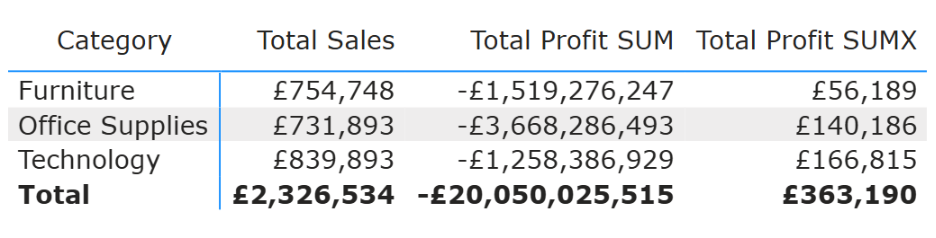
SUM(<column>)
The SUM() function takes in a column, and returns the sum of all the numbers that are contained in that column. For example:
Total Sales =
SUM(Orders[Sales])
returns the total value of the Sales column from within the Orders table. This works well when only one column is involved, but not so well when we start to bring in other columns.
Now that I have Total Sales, I want to work out the Total Profit.
In the Orders table, alongside the Sales column, there are also columns for Unit Cost and Quantity. Unit Cost can be multiplied by Quantity to derive the Total Cost. Total profit can then be determined as Total Sales minus this Total Cost.
Using the SUM() function, this would be:
Total Profit SUM =
Total Sales - ( SUM(Orders[Unit Cost]) * SUM(Orders[Quantity]) )
This *seems* correct, but SUM() aggregates the Unit Cost column and the Quantity column separately, and then multiplies the two totals together:
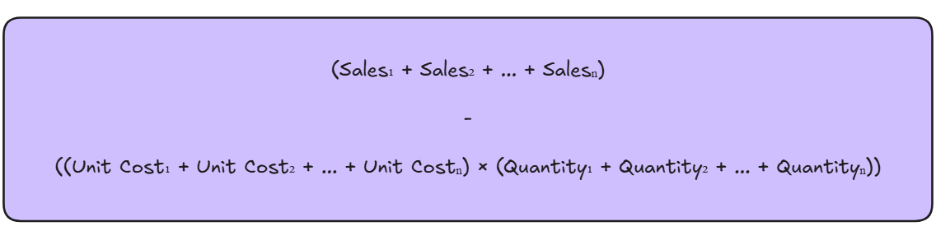
This ignores the row-level relationship between the fields, which is why the Total Profit result is massively inflated. To correctly work out the Total Profit, iterator functions (specifically SUMX()) are needed.
SUMX(<table>, <expression>)
The SUMX() function iterates through each row of the table that's placed as the first parameter, calculating the expression defined in the second parameter, and then returns the sum of all of those values.
If we use the SUMX() function to recalculate the Total Profit, this would look like:
Total Profit SUMX =
SUMX( Orders,
Orders[Sales] - ( Orders[Unit Cost] * Orders[Quantity] )
)
Unlike the previous calculation, this approach calculates profit at the row-level.
For every row in the Orders table, the formula first calculates Sales - (Unit Cost * Quantity). This gives the correct profit for each individual order. The SUMX() function then sums all of these row-level profit values to return the Total Profit for the given context, such as a specific Category:
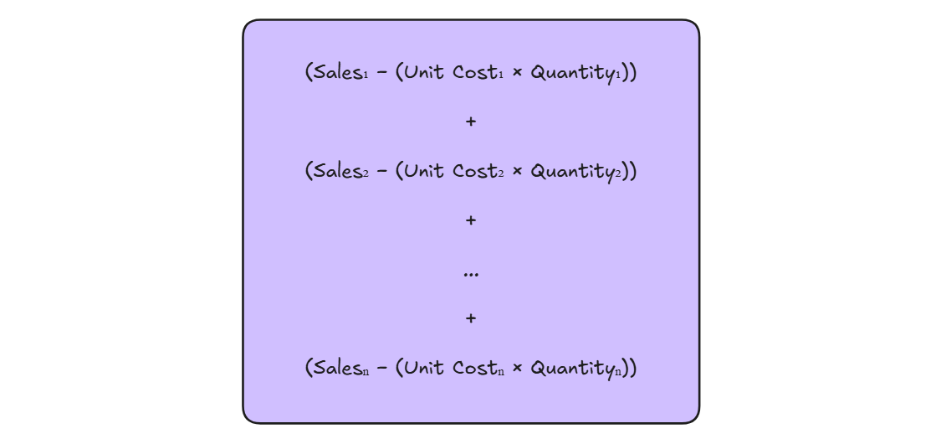
By performing the calculation at the row-level, SUMX() maintains the row-level relationship between Unit Cost and Quantity, ensuring that the Total Cost is calculated correctly for each transaction. Using this approach, the Total Profit returned was £363k, which accurately reflects the underlying data.
This example highlights just one of the many use cases for SUMX(). As an iterator function, it can be used to build more complex and dynamic calculations, like conditional aggregations. The fundamental concept behind SUMX() also extends to other iterator functions in DAX, such as AVERAGEX() and MINX(), which again evaluate expressions row by row before aggregating the results.