


What is SQL?
SQL, or Structured Query Language, is the standard language used to communicate with relational databases.
Most modern applications use Relational Database Management Systems (like PostgreSQL, MySQL, SQL Server). In these systems, data is organized into tables which look a lot like Excel spreadsheets with rows and columns.
SQL allows you to write "queries" to interact with these tables. Queries or Statements within SQL are used to access or manipulate the data that's stored within those tables, but can also be used to manage the structure of the tables themselves.
Beginner SQL Essentials
The Syntax Order of a SQL statement differs from its Order of Execution as shown below:
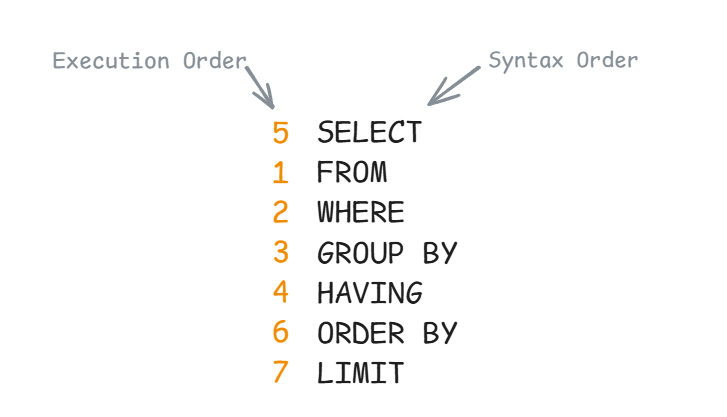
Let's break this down into each clause and their different variations!
SELECT
Defines which columns you want returned. For example:
To return all columns use
SELECT *
FROM customers;
To return only specific columns such as first name and country use
SELECT first_name,
country
FROM customers;
To remove duplicates, returning only the unique countries use
SELECT DISTINCT country
FROM customers;
To perform calculations on the go use
SELECT COUNT()
//SUM()
//AVG()
//MIN()
//MAX()
FROM customers;
You can also rename (give an alias) to a column in your select clause
SELECT country,
AVG(score) AS average_score
FROM customers;
FROM
Identifies a single table from which the records will be returned.
WHERE
Filters data row by row before any grouping or calculation happen.
Use math-like symbols to check values in a column (numerical data)
SELECT *
FROM products
WHERE price > 50;
Use ' ' to filter string data, and Boolean logic (AND, OR, NOT) to filter by more than one rule.
SELECT *
FROM products
WHERE city = 'London' OR city = 'Paris';
The above statement could also be written using IN
WHERE city IN ('London', 'Paris', 'Rome')
Use BETWEEN to filter values within a specific range, commonly used for dates
WHERE order_date BETWEEN '2023-02-02' AND '2023-12-31'
Use LIKE to filter values that contain a specific string, example below return all records with gmail users
WHERE email LIKE '%gmail.com'
Use IS NULL / IS NOT NULL to check for null values, example below returns all records with no recorded phone number
WHERE phone_number IS NULL
GROUP BY
Turns granular, row-level data into high-level summaries. If you have aggregates, you always need to group by your constant columns for the SQL to run. This rule exists because the database cannot display multiple individual "constant" values alongside a single summarized result unless you tell it how to bundle those individuals into groups.
SELECT city,
SUM(price) as total_price
FROM sales
GROUP BY city;
You can also use the column position as an alias for GROUP BY. For example the above query would be written as:
SELECT city,
SUM(price) as total_price
FROM sales
GROUP BY 1;
Can group by more than one column using
SELECT country,
city,
SUM(price) as total_price
FROM sales
GROUP BY city, country;
HAVING
To filter the results of a GROUP BY you must use HAVING
SELECT department,
COUNT(employee_id) as total_employees
FROM employees
GROUP BY department
HAVING COUNT(employee_id) > 5;
What the above statement does is grouping the employees by department, counts them up and then throws away any department with 5 or fewer people. Remember the order of execution!
Again you can use logical connectors like AND, OR for multiple criteria
HAVING AVG(price) > 50 AND SUM(stock) > 100
ORDER BY
Final step of a SQL query. It determines the sequence in which the data will be presented in the final table.
Use ASC (smallest to largest) or DESC (largest to smallest) to sort by the values of a column
SELECT name,
salary
FROM employees
ORDER BY salary DESC;
You can also sort by multiple columns
ORDER BY last_name ASC, hire_date DESC
Or similar to GROUP BY, you can sort based on column position (2-age)
SELECT name,
age,
city
FROM users
ORDER BY 2
That's all for now, stay tuned for my next blog on more advanced SQL talking about JOINS, UNIONs and CTEs. Hope this helped you understand the basics of SQL!
Apart from the training resources at TIL checkout this SQL course on Youtube (I gave this a go before starting my DS training and would highly recommend if you're interested in learning SQL)