


I'm in the process of levelling up my data preparation game. To do this, as I've mentioned before if you've read some of my other recent blogs, I have to practise. The best way to practise? By doing. So I'm working my way through the Preppin' Data challenges with the ultimate goal to complete the set - I don't know if this will ever happen honestly but I definitely want to get a full year completed at least. In the process of doing these challenges there are of course places I have stumbled, and learning from videos on the topics have helped me find my way. I've learnt some key tricks that don't solely pertain to the challenge itself but using Tableau Prep in general, and I'm stilling learning these new aspects 34 challenges into 2024. I thought I'd help you with some cheat codes though so that you can benefit from knowing these things earlier in your data preparation journey. So, stick with me and you can level up your Tableau Prep knowledge in a new way, without even opening up Tableau Prep.
Tip 1: Unioning multiple tables
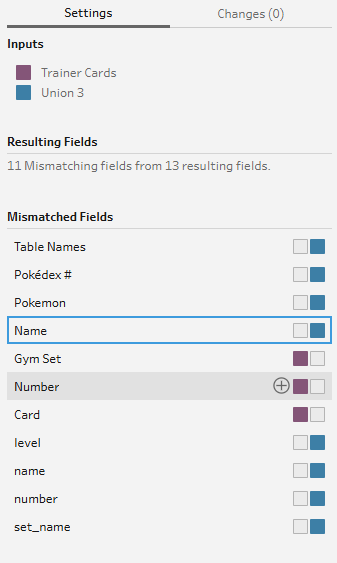
I thought I knew how to union tables. And to be fair, I do. But I also thought that to make it work, all of the column names had to match so they would sit perfectly in line together. Whilst it's true, the content of the columns need to match or it defeats the point of wanting to union in the first place. How it would be of any use to you to union columns that don't match in terms of content I don't know but anyway, I digress. The point that I am making is that you can set which columns match in the union tool itself rather than going through and renaming each column individually and still sometimes being left over with pesky lowercase column names not matching capitalised columns.
Simply click your column in table A indicated by one colour, then click the plus beside your unioned column in table B indicated by a different colour and boom. The job is done.
Tip 2: Unioning when already in the canvas.
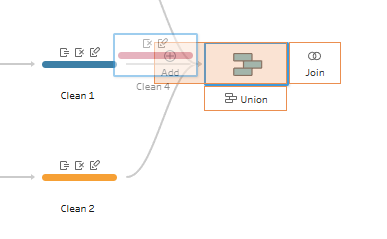
I guess the jokes on me that I started the previous tip with thinking I knew how to union tables and now have written two tips on it. I just didn't know the hidden secrets but now you can too! Whenever I unioned before, having made changes in cleaning steps and so needing to insert the individual tables into the canvas first, I did individual unions which sometimes meant I'd end up with 5 or so unions in a row. You don't need to do this! When you drag your table to union on an already unioned table, you'll see an 'add' option pop up on the left. Ensure that you've dragged your table over to the add option and drop it in and ta da! A multi-table union in one step.
Tip 3: Line breaks.
I don't even know where this comes under - is it code, it is some other foreign item that I don't understand? Either way, I was incredibly confused when I tried to split my columns on this random '\n' that kept appearing in my dataset for some reason, and the column wouldn't split. I tried just using the slash in case somehow my split function wasn't working but that wouldn't work either. I was well and truly stumped. Well, when I peeked at the solution to see how they had managed to complete this mysterious split, they had used the string CHAR() function. Specifically CHAR(10). This is because the '\n' wasn't indicating a slash n as I originally thought but a line break, and therefore it wouldn't work with my split function. You can also use this function in Tableau desktop calculations if you want to format labels to look pretty!

Tip 4: Disappearing nulls.
This might not be the most groundbreaking discovery however, it is something that I learnt that I thought might be important to note. I tried to do a not equal to statement to eliminate all rows where x field = y field, however this meant that for rows which were null in the x field, they also got eliminated. Luckily, these null values were at the top of my data so I noticed this and promptly googled what was going on. This seems to be a multi-platform issue from the looks of things but not something that I'd realised could ever occur. So top tip there - keep an eye on your nulls if you want to keep those rows and you're using a 'not equals to'!
Tip 5: LOOKUP.
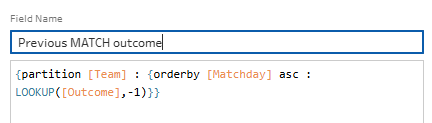
Maybe I've been working in Alteryx too much or just not had the opportunity to look across multiple rows in Tableau Prep recently but I had no idea how to compare a value from a different row. In Alteryx, you use a multi-row formula tool so all I could think about was how great it would be to be able to just do [my row -1] but that did not work out. That's because Tableau has a built-in function that does just that called the LOOKUP function. It does the same thing and you can compare across many rows, not just the one above and also partition by a category if you'd like to do so (similar to an LOD).
Tip 6: Merge fields.
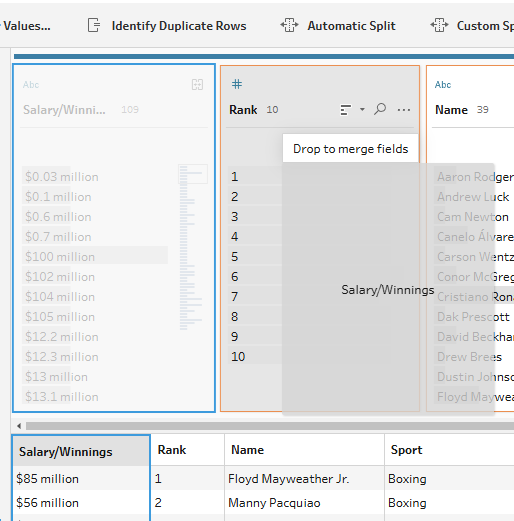
This is quite a specific problem but I brought multiple tables into the canvas using a wildcard union for one of the challenges, but some of the fields didn't have the exact same column names. As ever, nulls were produced. In my head, I decided to start using calculated fields because that's what you do. But then, multiple calculated fields in, I discovered the merge. All you have to do it drag and drop one field on top of the other and life becomes so much simpler.
Tip 7: Missing fields.
Sometimes I'll go to do a step in my preparation process and the step just won't work because my fields no longer exist. What has happened? I thought my Tableau Prep was broken when this happened to me but really, it was all on me, as per usual. For example, I was trying to do a generate new rows step ordering by jersey number in one of the challenges and my jersey number field just didn't exist. You know why it didn't exist? Because it was a string data type, not a numerical data type. So, my key recommendation here is, before you do anything, make sure that your number one priority is having accurate field data types. This will help when you're creating new steps, new calculated fields etc.
There are my top hidden secrets from completing a full year of Preppin' Data challenges (yes, I've managed to complete the year since the start of this blog post!). This isn't a comprehensive list of things to learn, just some new things I've discovered from my deep dive into data preparation. Hopefully you've learnt something from this too. If you also want to level up your data prep like me, I would definitely recommend practise. You'll learn so much from testing your skills and likely discover more hidden secrets that you didn't realise existed too. Until next time, happy prepping!