


If you want to learn how to write sub-queries in SQL, I'd recommend having a firm grasp on the basics first. You should always build on a solid foundation! I know nothing about construction but I think is universally legitimate. If you'd like to work on your foundations, I've written a blog on the basics that takes you through the different types of clause and when/why you might use each one. Now that we're up to the same speed, let's explore what sub-queries are and how to write them with a few examples.
What is a sub-query?
A sub-query, as the name suggests, is a query within a query. It's kind of like you're trying to solve a puzzle in SQL and you've got most of the pieces but you're missing one to help you complete the picture, so you need to create your own new piece and finish the puzzle. I hope that analogy doesn't only make sense in my head. Essentially, you use a sub-query when the value(s) you're looking to use in a query can't be automatically called within your dataset. You use the same format for a sub-query as you do for a main query, just inside brackets to keep it all neatly nested together.
Types of sub-query
There are a variety of types of sub-query with groupings by dependency, result and location of sub-query.
Results
Results are the simplest groupings and they categorise the sub-query based on what they're outputting. You can have a scalar sub-query which returns one single value (1 row x 1 column), a row sub-query which returns a list of multiple values (multi row x 1 column) and a table sub-query which returns a matrix of values (multi row x multi column).


Location
Location are the next simplest groupings I would say. They categorise the sub-query based on where they are being used in the main query. There are 4 key locations where a sub-query can be used and these are in the SELECT, FROM, JOIN and WHERE clauses. Where they are used depends on where the temporary information is needed. This might often overlap so you could use the sub-query in a slightly different format in various clauses. In these cases, I would recommend choosing the place that makes the most sense to you. You might also want to use the sub-query in multiple places. For example, if you're filtering by avg. product count in the WHERE clause, you might also want to show what the avg. product count is using the SELECT clause. Here's a breakdown of using a sub-query in each clause:
- For a SELECT clause, you'll likely be needing a temporary value for a further calculation in the main query or taking the value from an unrelated table. Importantly, the output of the sub-query in this instance must be scalar as only a single value can be output and used in the main query if executed in the SELECT clause.
- For a FROM clause, you'll likely need to create a new column in the temporary table which is then used for a further calculation in the main query.
- For a JOIN clause, you'll likely need to create a new column in the temporary table which can be executed prior to the join and then used in conjunction with another table in the main query.
- For a WHERE clause, you'll be looking to filter your data based on more complex logic than one simple hard-coded value. This might be with a mathematical operator (e.g. >, =) where a scalar sub-query is required as it's not possible to compare to multiple values. You can also use a logical operator (e.g. IN, ANY) with any type of resulting sub-query, to filter the main query based on the comparison values from the sub-query.
Dependency
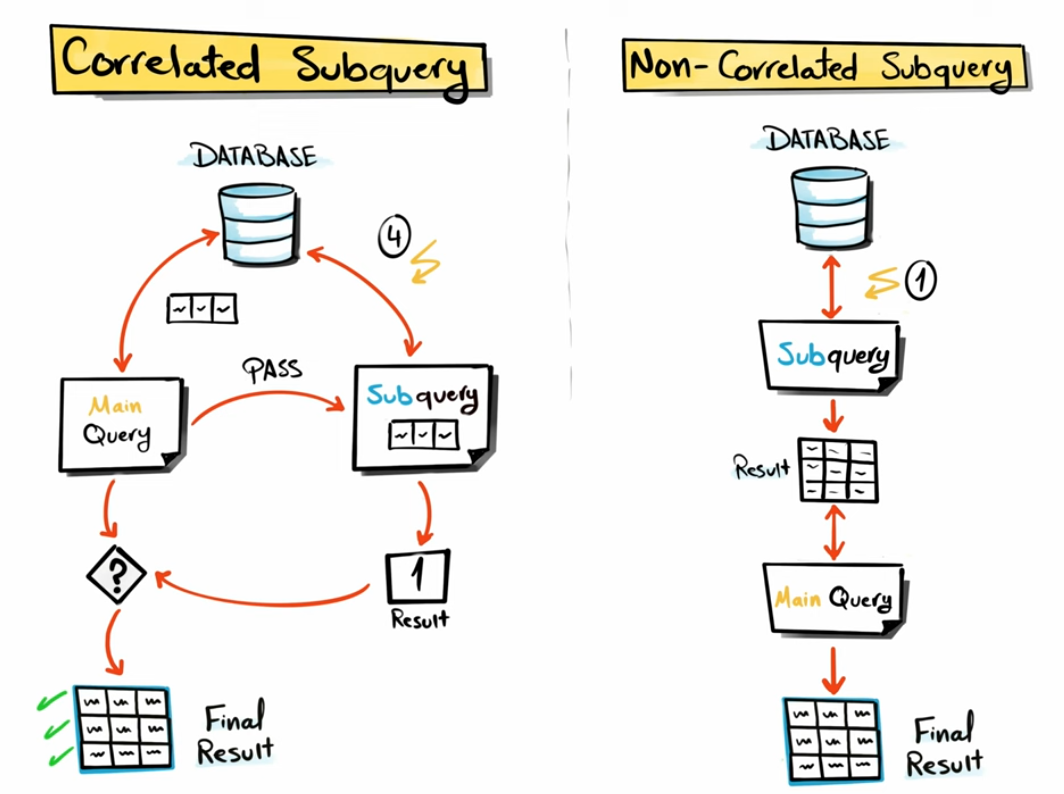
Dependency of sub-queries is the trickiest grouping in my opinion to get your head around. A non-correlated sub-query is your standard sub-query. These are the straightforward sub-queries which act separately to your main query. In terms of what's going on beneath the hood, a non-correlated sub-query is performed to completion before the main query is performed. Meanwhile, a correlated sub-query is a little more complex because it is reliant on what's being parsed from the main query. Thus, the sub-query occurs in row-by-row iterations in alignment with the main query rather than completing prior to the main query. It's sort of like the main query filters what happens in the sub-query. For example, a sub-query returning the totals orders value in a table to each row (with the same overall value) would be a non-correlated sub-query because it isn't specifically associated with the main query. However, a sub-query returning the total order value per customer in a table to each row (with an individual value per customer) would be a correlated sub-query because it's based on what is being input by the main query.
It's good to gain an understanding of the types of sub-query available to you but don't be too worried if it's all seeming a little confusing right now. The best way to understand sub-queries as a whole in my opinion is by working through some, so let's do that with a few examples.
Examples of sub-queries
Just before we start going through examples, I think it's important to clarify how sub-queries are written. The most important thing to know is that sub-queries are always encapsulated in brackets. You can label your sub-query with an alias and this is optional in most cases but be sure to check that it is on your system, otherwise you might be confused about why all of your queries are erroring. All non-correlated sub-queries can be run on their own so that you can check they're working whilst correlated sub-queries are dependent on the main query (although you can find your way around this to test them at least by equalling your sub-query value to a known value in the main query). Lastly, when writing a sub-query, I think it's easiest to write the sub-query part first but that's truly subjective. I think it's easiest to start from the finest details and then work outwards but do what makes sense to you as long as you're writing in sections and not mixing and matching your main query with your sub-query.
For reference, I'm writing these sub-queries in Snowflake SQL so there might be a few minor differences in syntax if you're using a different flavour of SQL but the basic structure of the sub-query will remain the same. I'm using a superstore dataset too. I have bolded the sub-query section of the code in each example for ease of understanding.
A WHERE sub-query (mathematical operator)
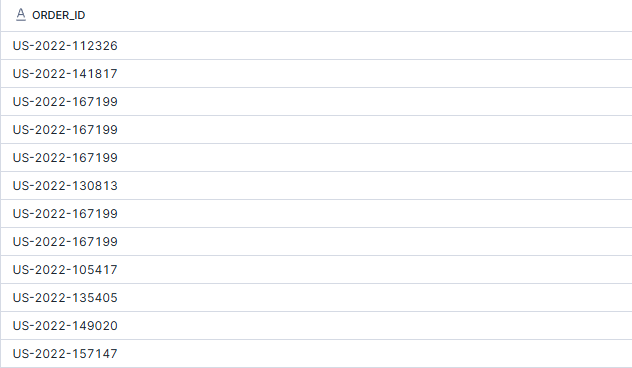
In the example below, I want to return all orders where the values of sales is higher than that of the specified order ID. To be able to achieve this, I need to first calculate the number of sales for the specified order ID (as you see in the sub-query), and then I can insert that value into my where statement. In this instance, my sub-query is scalar which is important if it is being used in a WHERE clause with a mathematical operator.
SELECT
order_id
FROM orders
WHERE sales > (SELECT sales
FROM orders
where order_id = 'US-2022-103800')
A WHERE sub-query (logical operator)
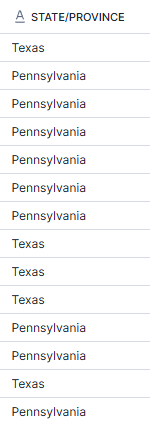
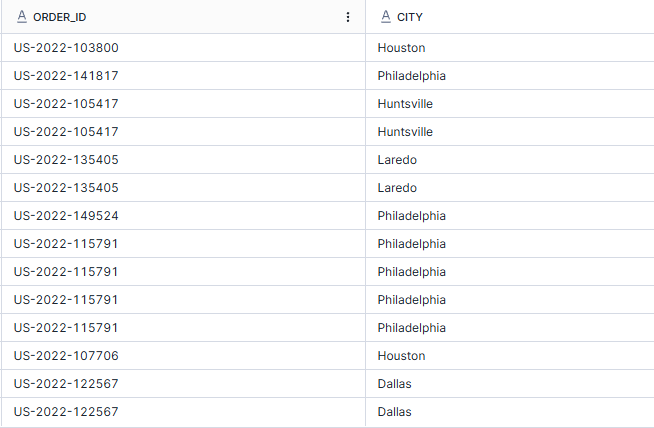
In the example below, I want to return all of the orders which were sent to cities in the same states as Houston and Philadelphia. As it's not best practice to hard code things and as we're learning to sub-query, I've used the sub-query to find out which states Houston and Philadelphia are in and filtered the orders to have the same state. In this instance, a row sub-query is in use as there are multiple rows for the state column.
SELECT
order_id
,city
FROM orders
WHERE state IN (SELECT state
FROM orders
where city = 'Houston' OR city = 'Philadelphia');
A SELECT sub-query
So far, we've only used sub-queries to filter in WHERE clauses. Now we can take a look at how to use sub-queries for calculations within a SELECT clause. This is very similar to the sub-querying we've done before, just in a different place essentially.
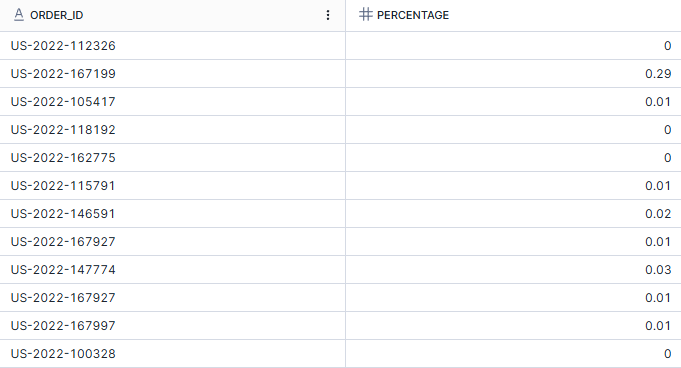
In the example below, I'm looking at all of the orders within the binders sub-category and I want to return the sales value for each order as a percentage of the total sales of binders. To be able to return this percentage value, I first need to find the total sales value for binders and then insert this value into the percentage calculation. In this instance, the sub-query is scalar which is important because I can only use one value within a calculation.
SELECT
order_id
,ROUND(sales*100/
(SELECT sum(sales)
FROM orders
WHERE sub_category = 'Binders'),2) as percentage
FROM orders
WHERE sub_category = 'Binders';
A FROM sub-query
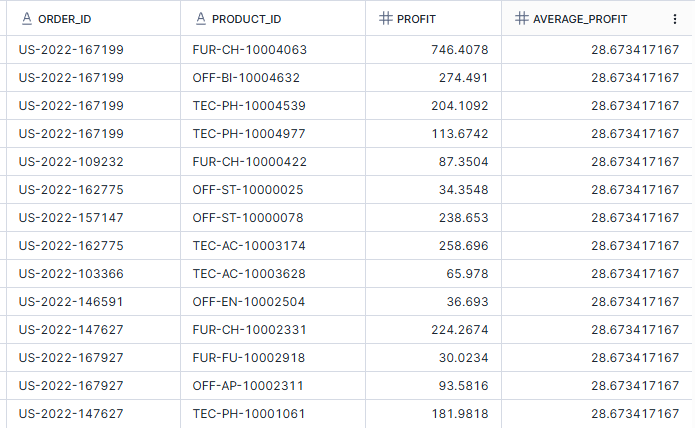
In the example below, I want to know which orders generated profit that's higher than average. To do this, I first needed to create a table with the added column of average profit as a sub-query and from this, I could then use a conditional WHERE clause to only output those orders with a higher profit than average within the dataset. This is a table sub-query as I've got multiple rows and columns in the temporary output. Importantly, you can't skip the sub-query and head straight to the WHERE clause as you might have wanted to because average is a window function and these occur after the WHERE clause in SQL's order of operations.
SELECT
*
FROM
(SELECT
order_ID
,product_ID
,profit
,avg(profit) over () as average_profit
FROM orders)
WHERE profit > average_profit
A JOIN sub-query
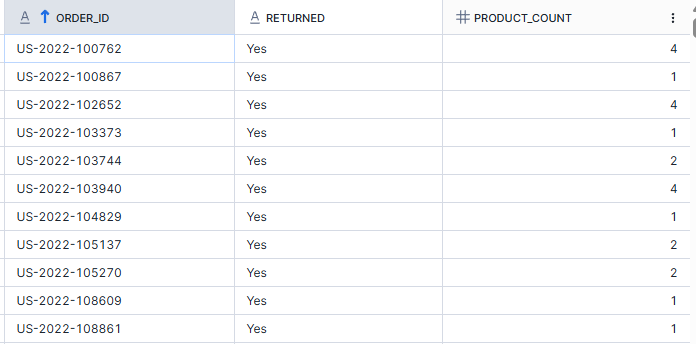
In the example below, I want to know the number of different products in a returned order. As the returns table only includes order ID and whether the order was returned, I need to join the table on a sub-query so that I can include a total products column. I am able to create this total products column by counting the rows for each order ID (with the knowledge that the table is at the product by order level so each row represents one product). Just to note, it's important to label your joining table outside the sub-query so that you can refer to it in the rest of the main query.
SELECT
r.order_id
,returned
,Product_count
FROM returns r
JOIN (SELECT
order_id
,count(*) Product_count
FROM orders
GROUP BY order_ID) o
ON o.order_id = r.order_id;
A correlated sub-query
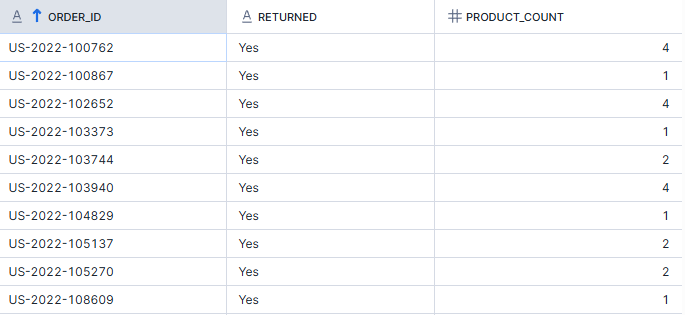
In the example below, I want to do exactly the same as above but I'm simply demonstrating a different way to go about it. So I'd like to know how many products were in orders that were returned and to do this, I'm counting the rows for each order ID where the order ID in the orders table is equal to order ID in the returns table. As this is at a row by row level, it is a correlated sub-query and as I'm not generating multiple rows/columns at once, I can use the sub-query in the main SELECT clause. As you'll see, the table generated is the same and this is a great demonstration of how in SQL, there are often multiple ways to get to the same answer. In this case, it is preferable to use the JOIN sub-query above rather than the correlated sub-query below as the JOIN sub-query can lead to better performance because it's only being performed once.
SELECT
*
,(SELECT count(*) FROM orders o WHERE o.order_id = r.order_id) as Product_count
FROM returns r;
A sub-query within a sub-query
In some cases, one sub-query might not be enough to produce the output that you need. In these instances, an extra query might be necessary that can act as a sub-query within a sub-query. N.B. The unbolded section between the bolded lines of code is the sub-query within a sub-query.
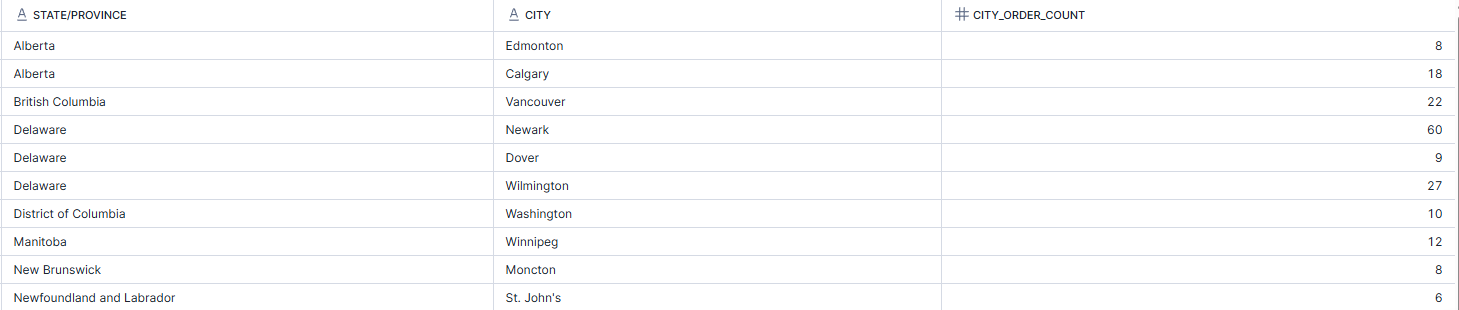
In the example below, I want to return the states, city and order count where all cities within that state have more than 5 orders. To do this, I first need to calculate the count of orders by state and city to create the innermost sub-query. I then need to filter this table to show only the states with a minimum order count of 5 as my outer sub-query. I then use this state output to filter the main query and obtain the state, city and count of orders for my overall query output.
SELECT state, city, COUNT(order_id) as city_order_count
FROM orders
WHERE state IN (
SELECT state
FROM (
SELECT state, city, COUNT(order_id) as count_order
FROM orders
GROUP BY state, city
)
GROUP BY state
HAVING MIN(count_order) >= 5
)
GROUP BY state, city
ORDER BY state;
Conclusions
Now that we've covered the different types of sub-queries and walked through an example of each, you should have a solid understanding of when and where you might use them plus what type of sub-query might be needed. If you're looking for some additional resources on learning sub-queries, I'd like to recommend Data with Baraa from Youtube who has an excellent, extensive video on the topic. I also used SQL Zoo to test out my knowledge.
Towards the end of these sub-queries, you might have noticed that some parts got a little complicated. That's when ctes (common table expressions) might be easier to use which we'll explore in my next blog post. Until next time, happy coding!