


Joins in data preparation can often stump people, but this guide aims to simplify the differences between each type. There are four types of joins; Inner, Left, Right and full Outer. They allow you to connect multiple datasets to each other, based on common fields.
Joins Vs Relationships:
Before diving into joins, it’s important to distinguish them from relationships in Tableau.
Relationships are performed in Tableau's logical (top) layer and do not merge tables together physically. We use these when we want to keep separate tables and not lose any data for analysis. Relationships are more intuitive when we have multiple datasets at different granularities. Tableau will perform joins and aggregations in the background, avoiding the duplication or dropping of values.
Joins however, are performed in Tableau's physical (bottom) layer and will combine tables into a single, static dataset. It gives the user full control over the data. This can result in duplicated aggregate values if the joined tables are at differing levels of granularity. We often use joins when two tables have the same level of granularity or we have the flexibility to exclude values.
To provide a visual guide through the joins, I have used some simple AI mock data and drawn some Venn diagrams myself to show how the data is interacting.
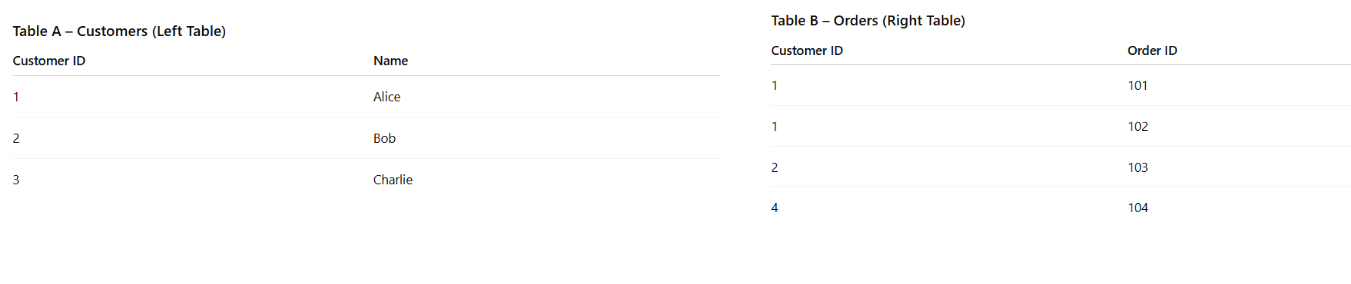
Mock Data: Table A (Customer Table) & Table B (Orders Table).
INNER JOIN:
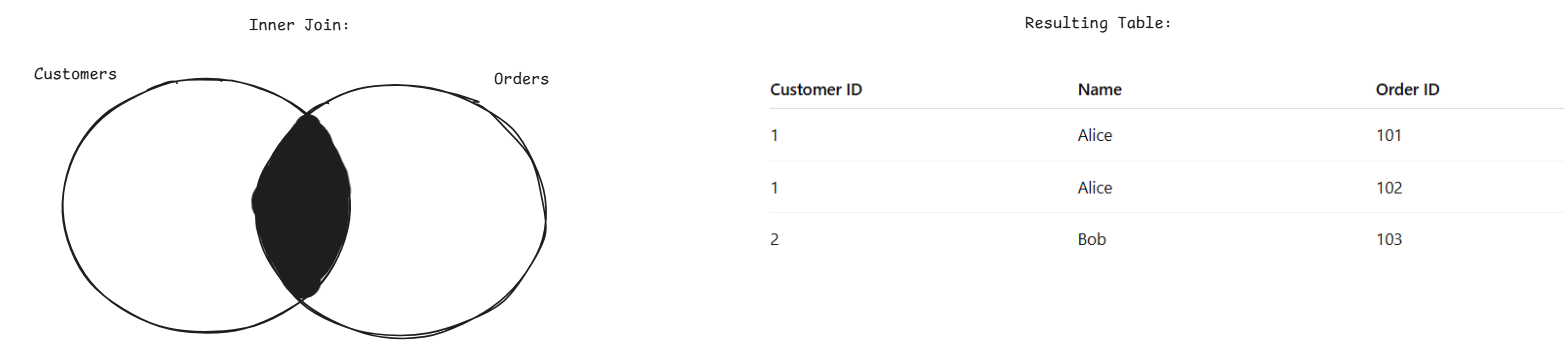
What is it? - An inner join will take two tables and join on a common field, so Customer ID in our example. It will then return the values that have a matching field in each table. Any unmatched records are excluded.
Example: An inner join on the Customer ID field will keep all rows which appear in each table. So, we lose Charlie, as their ID is not in the Orders Table, and we lose Customer 4, as they do not appear in the Customers Table. Alice is also duplicated as she has ordered twice in the Orders Table.
When to use: If you want records that exist in both datasets.
When to avoid: If missing or unmatched data is important to your analysis.
LEFT JOIN:
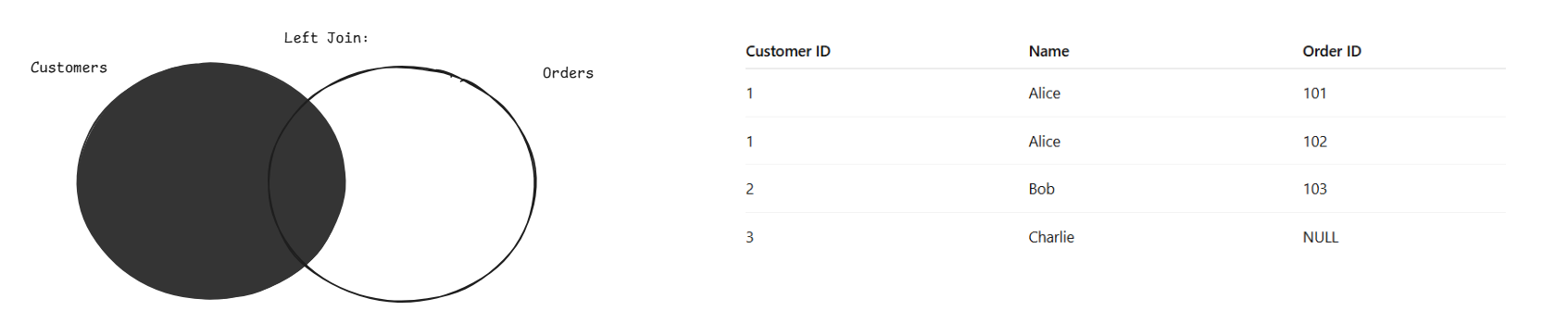
What is it? – A left join returns all records from the left (primary) table and any matching records from the right table based on a common field. If there is no match then the result will include nulls for the right table fields.
Example: A Left Join on Customer ID keeps all the records from the Customer Table and joins any matching records in the Orders Table. So, Charlie remains in the table, and their Order ID now returns null. We lose Customer 4 as they only appear in the Orders Table. We also see that the duplication of Alice still occurs.
When to use: When you want to retain your primary dataset while enriching it with additional fields from another table.
When to avoid: When you only want fully matched records or want to avoid introducing null values.
RIGHT JOIN:
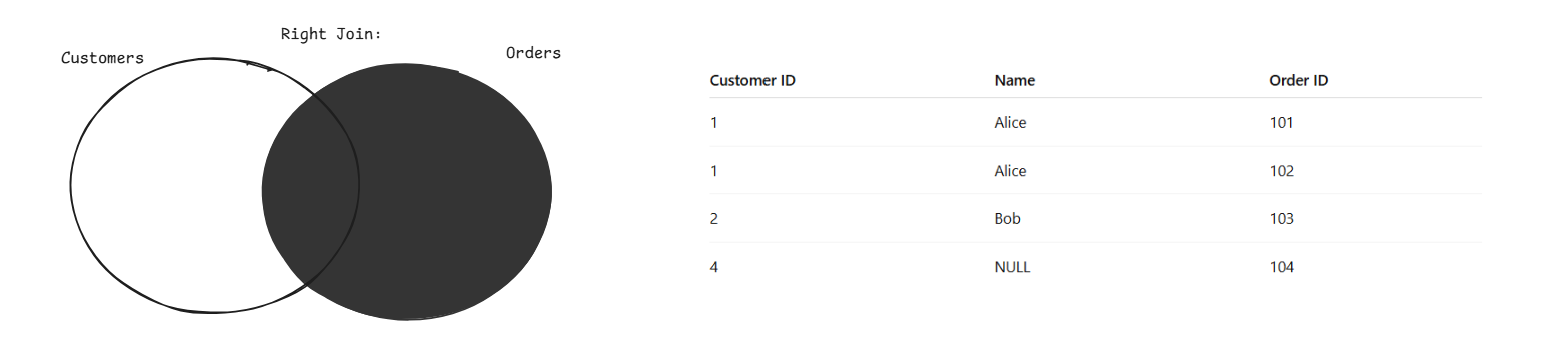
What is it? – Returns all records from the right table and any matching records from the left table based on a common field. If there is no match, the result will include nulls for the left table fields.
Example: You guessed it, a right join will do the opposite of the left. So Customer 4 stays with a NULL name, Charlie is excluded and Alice is duplicated.
When to use: When you want to retain all of the records from the right table, e.g., if that is your primary dataset.
When to avoid: When you only want fully matched records or want to avoid introducing null values.
FULL OUTER JOIN:
What is it? – Returns all records from both datasets and matches on a common field. If there is no common field in a dataset, it returns nulls
Example: A full outer on Customer ID keeps every single row and duplicates Alice's name due to her ID appearing twice in the Orders Table. It is the most unclean outcome we could have, and is rarely the correct choice in data preparation due to this.
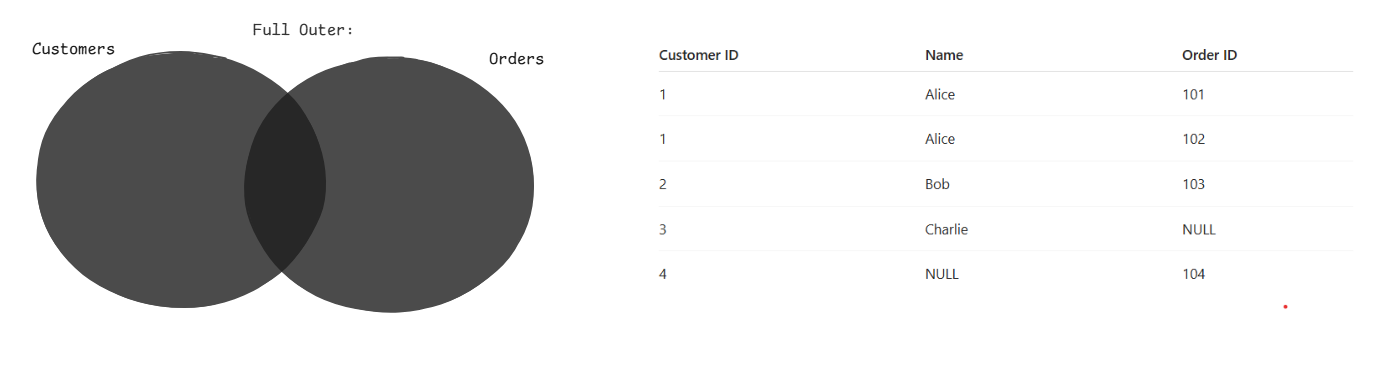
When to use: When you want a complete view of both datasets, including unmatched records from each.
When to avoid: When you only care about matched data or want to avoid handling null-heavy outputs.
Final note: I hope this provides an easy-to-follow guide on the different types of Joins in data preparation, as choosing the wrong one can seriously distort your data. It is essential to consider the granularity of each table and what your analysis is trying to answer before deciding on a join type.