


How to know what you, and others, can access on Tableau server, based on your user and group settings.
User 'vs' Group Settings
User settings are the unique settings that apply to an individual person.
A group setting is the general permissions set within a group. If you are part of a specific group, then the particular permissions set also apply to you. It is much easier to group employees for particular projects, so when it comes to access, you can set the permissions of a 'group', and those specific criteria apply.
Types of setting: Site Roles
A user is assigned a 'site role' in the tableau server, irrelevant to their license type (creator, explorer or viewer). The site role signifies the maximum level of access a user has on the server.
Server admin: 'GOD of permissions': All access. Can create users and set site roles. Can create projects and set permissions.
Site admin: A site is a collection of users, groups and work, walled off from other sites (collections). A site admin has access to everything within the site. They can restrict access to users.
Creator: Can connect, download, edit, build and save/ publish to the server.
Explorer (can publish): Cannot publish new content, but can save edits made via web-edit.
Explorer: Can interact with published, but can’t save changes
Viewer: Can see content, but cannot amend/interact with it. E.g. can use filters, but cannot open dashboards in web-edit.
Unsubscribed (Use this is an employee has left the company- you do not need to pay for their license key, and you can still see the work they created)
Types of permission you can set
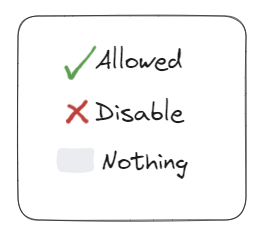
There are three types of setting: allowed, disabled and nothing. Whilst 'allowed' and 'disabled' are intuitive, there is a third option, 'nothing'. If you set access to nothing, permissions will follow the basic workflow logic...
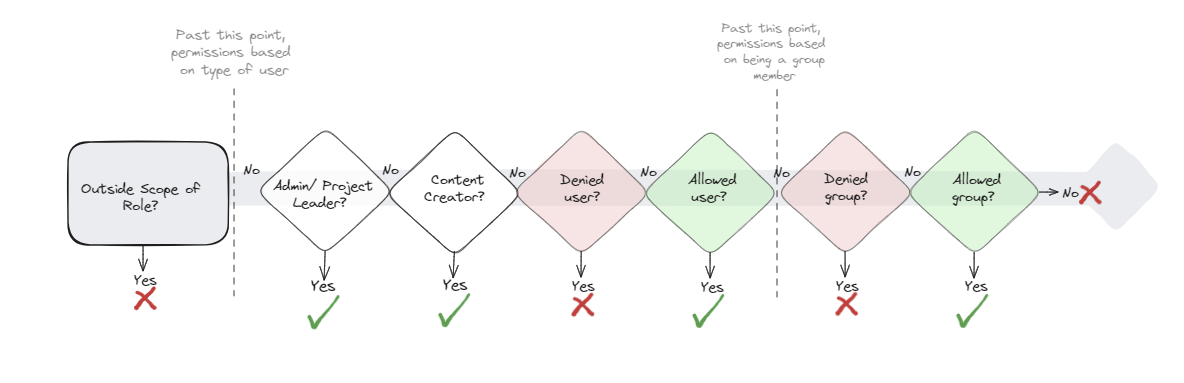
The workflow broadly considers the type of setting you have (your site role). Within this flow, note that 'user' settings take precedent over 'group' settings, and 'denied' access takes precedent to 'allowed'.
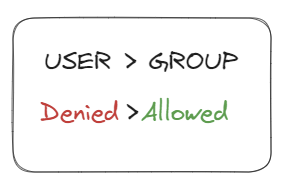
USER > GROUP. This is important because if your user setting is 'less' (more restrictive) than your group setting, your access should default to your individual user setting, to consider that first.
Denied > Allowed. If you have been specifically denied access as a user or group, this should be considered first, like an initial road block. If you haven't been restricted as a user or group, then you are good to go, edit away. (Remember to publish as a copy though!)