


Wildcard unions are a trick in Tableau Prep that might save you from a lot of repetitive work if you ever need to stack multiple files with the same structure.
What is a Union?
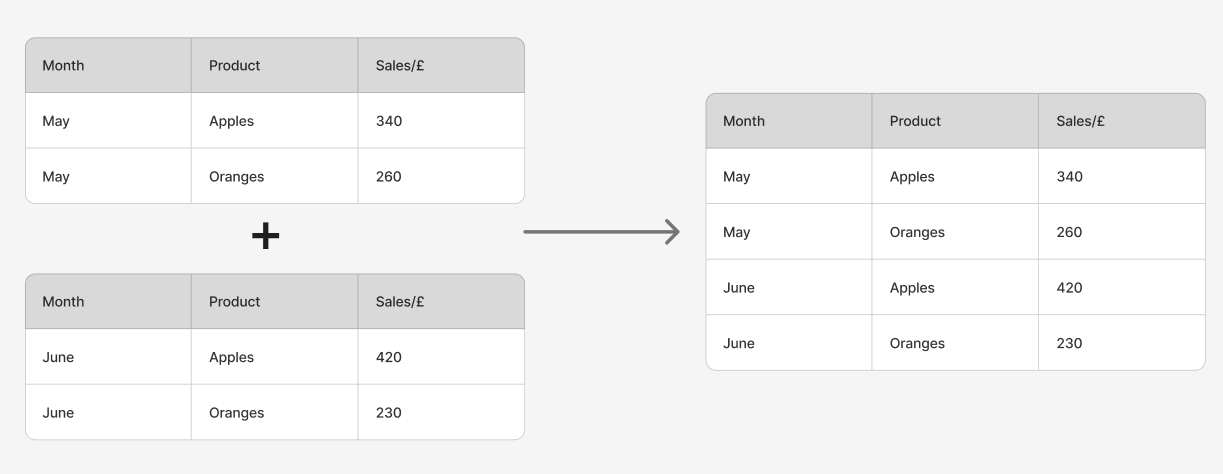
In Tableau Prep, a union is used to combine datasets by stacking them on top of each other. This means the rows from one dataset are added underneath the rows from another, while the columns remain the same.
You would typically use a union when you have multiple files that contain the same fields but different records. A common example is data that is split by time period or location, such as:
- Monthly sales files (January, February, March…)
- Separate files for different store branches
- Annual extracts stored in different spreadsheets
If each dataset has the same structure, a union allows you to bring them together into a single dataset for analysis.
The Challenge with Many Files
When you only have two or three files, creating a union is straightforward. You can simply drag each dataset into the union step and Tableau Prep will stack them together.

However, in real-world situations you might have dozens of files that follow the same naming pattern, and dragging each one in manually can quickly become time-consuming.
This is where wildcard unions become extremely helpful.
What is a Wildcard Union?
A wildcard union automatically combines multiple files based on a shared naming pattern.
Instead of selecting every file individually, you tell Tableau Prep to include all files that match a certain pattern, such as:
Sales_2023_JanSales_2023_FebSales_2023_Mar
Using a wildcard pattern like Sales_2023*, Tableau Prep will automatically include every file that starts with that name.
This means that if new files are added later that match the same pattern, they will be included automatically the next time the flow runs.
Why Use a Wildcard Union?
Wildcard unions are especially useful when working with datasets that are regularly updated or stored in many similar files. They help to:
- Save time by avoiding manual unions
- Reduce maintenance, since new files are picked up automatically
- Keep workflows scalable when datasets grow over time
Instead of updating your Prep flow every time a new file appears, the wildcard pattern handles it for you.
How to Create One
Creating a wildcard union is straightforward in Tableau Prep. From the input step, you can choose the option to create a wildcard union, then specify the file path and the naming pattern that should be matched.
In the screen recording below, I’ll demonstrate exactly how to set this up and show how Tableau Prep automatically brings the files together.
In this example, we have a set of five tables which represent sales data in different cities, and a table with sales targets. The tables for each city have the same structure so we want to union them into one table, but the targets table needs to be treated a bit differently.
In this situation, we can use a ‘Doesn’t match’ wildcard union at the worksheet level. This allows us to union all sheets in the file except those matching the wildcard ‘Targets’
When the union is done, there is a new field called 'Table Names' with the title of the worksheet that each row came from (in this case, the name of the city). You can see in the video that the targets table has not been unioned with the other tables.
Example use of Wildcard Unions
Final Thoughts
Wildcard unions are a simple feature, but they can make a big difference when working with large collections of similar files. By letting Tableau Prep identify and combine files automatically, you can build workflows that are much easier to maintain and scale as new data arrives.