


Power BI allows you to get data in a number of ways, one of which is via web address. This opens up the functionality to make API calls to access data. Day two of dashboard week involved a 'Numbers API' that generates facts based on a number/date/year of your choice.
In this blog I'll be walking you through my plans, how I accessed this API, what I made with the data and the challenges I faced.
Plans
For this challenge, I thought it would be cool to create a historical fact generator that allowed you to select a century, decade and then finally a year to generate a random fact about that year.
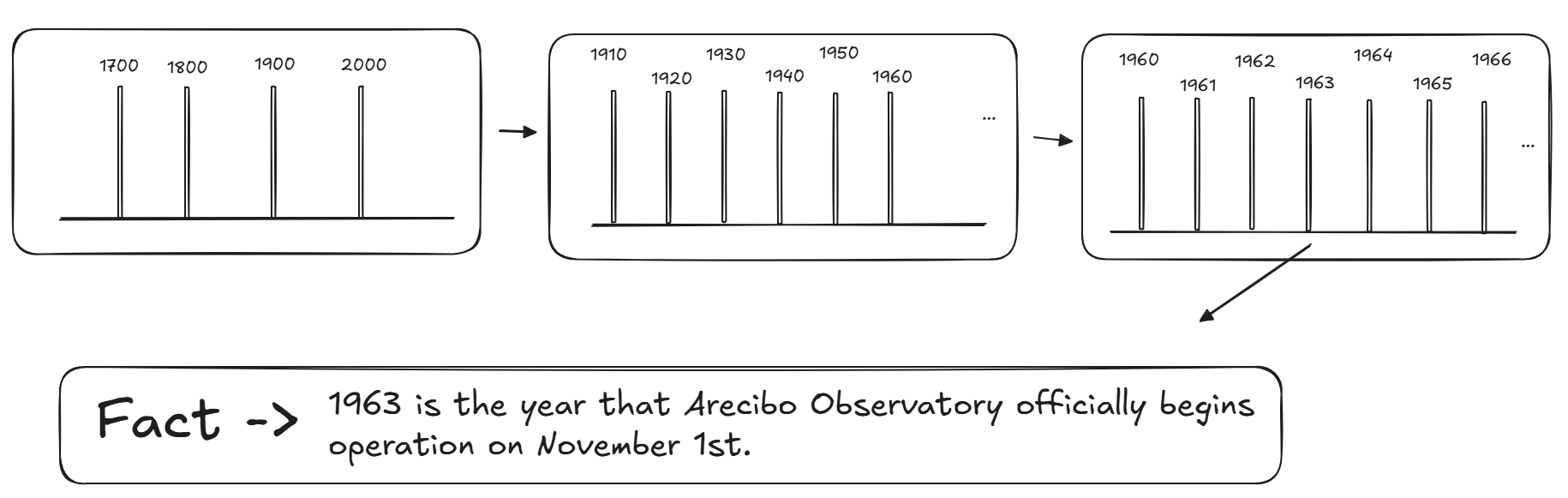
To do this, I would have to call the fact data for a range of years, create columns for the decade and century and then create a hierarchy to allow the user to drill through this hierarchy.
Getting the Data
After reading through the API documentation, it was noted that I could call through a range of values but only up to 100 records at a time. Using the web connection option in Power BI, I used the appropriate URL (as stated in the documentation) to pull this data through, a century at a time. I could then append the century tables together and prepare the data in Power Query.
Outcome
I was able to produce a dashboard with the drill down functionality, showing facts from the 2020s all the way back to the 1000s. As the API allowed you to access facts for particular dates as well, I was able to replicate my year drill down, using months instead of centuries and decades (however, this came with its own challenges that I will discuss).
While the functionality worked, I noticed some errors in a few of the rows which leads me quite nicely onto the next section.
Challenges
As mentioned, some of my rows were not pulling through correctly from Power Query.

The fact had been pulled through on its own row, in the wrong column. As this issue was not occurring in Power Query and the table was not static (the API was called and therefore refreshed with new facts every time Power Query was opened), it made troubleshooting this issue incredibly difficult.
A similar thing occurred with the Day section of the dashboard, with some rows simply being null. Because of this, I wasn't able to sort the days correctly.
Final Thoughts
While APIs in Power BI may seem relatively easier than other tools such as Alteryx, this simplicity may actually make it more difficult to troubleshoot exactly where an issue is happening. This is where using a tool like Alteryx could come in handy. I am also interested to see how Power BI handles pagination. With that being said, this was an enjoyable challenge and I hope you enjoy learning some historical facts with the dashboard!