


When I think about incorporating AI within the Data world, one of my main concern is the ability of the LLM to understand what data to look at, what it means, and anything relating to business context.
This is where you traditional Semantic Layer would come in handy, translating complex raw data sources into business terms ready to be handled by business users. This can be built in different ways, Snowflake specifically created a SQL Object called the semantic view which allows you to design and document your semantic layer within a single location. The semantic view then contains information organised as dimensions, metrics, facts, and relationships. Once this is set up Cortex Analyst can access all this information and data to provide you with the best queries.
Now before you create your semantic view, it's important to design your data model. What are the current tables, where do you find what information, how would you join these tables? These are all concepts you will require to build your semantic view.
Here's the SQL code you will require:
CREATE OR REPLACE SEMANTIC VIEW SV_Jules_model

-- Step 1: Define the Tables present in the Semantic View, this is to ensure tables are named properly

TABLES (
    <Table_alias> AS DB.SCHEMA.TABLE1 PRIMARY KEY (Table_id),
    users as DB.SCHENA.User PRIMARY KEY (User_ID),
    stores as DB.SCHENA.Store PRIMARY KEY (Store_ID)
    )

-- Step 2: Define the relationships between the tables, this is how different tables are related

RELATIONSHIPS (
    Table1(user_id) REFERENCES User(user_id),
    Tables1(store_id) REFERENCES Store(store_id)
)

-- Step 3: Define the Dimensions, this is just making sure they are renamed properly

DIMENSIONS (
    -- Start with Table 1
    Table_Alias.order_id AS Table1.order_id,
    Table_Alias.user_id as Table1.user_id,
    -- Then the next
    user.user_id as user.user_id
    user.user_name as user.name
    -- Then the next etc
    store.store_id as store.store_id
    store.store_name as store.name
)


-- Step 4: Define your metrics, those will be aggregate for example:

METRICS (
    table1.total_sales as SUM(table1.sales),
    table1.proft as SUM(table1.sales - costs)

);
Once that's create you can access the semantic view UI to add more tables, fields either via the data explorer or via a link create by this query:
SELECT 'https://app.snowflake.com/' || CURRENT_ORGANIZATION_NAME() || '/' || CURRENT_ACCOUNT_NAME() || '/#/studio/analyst/databases/db_name/schemas/schema_name/semanticView/semantic_view_name/edit' AS RESULT;
This is the interface you get to via this link, which is the cortex analyst UI:
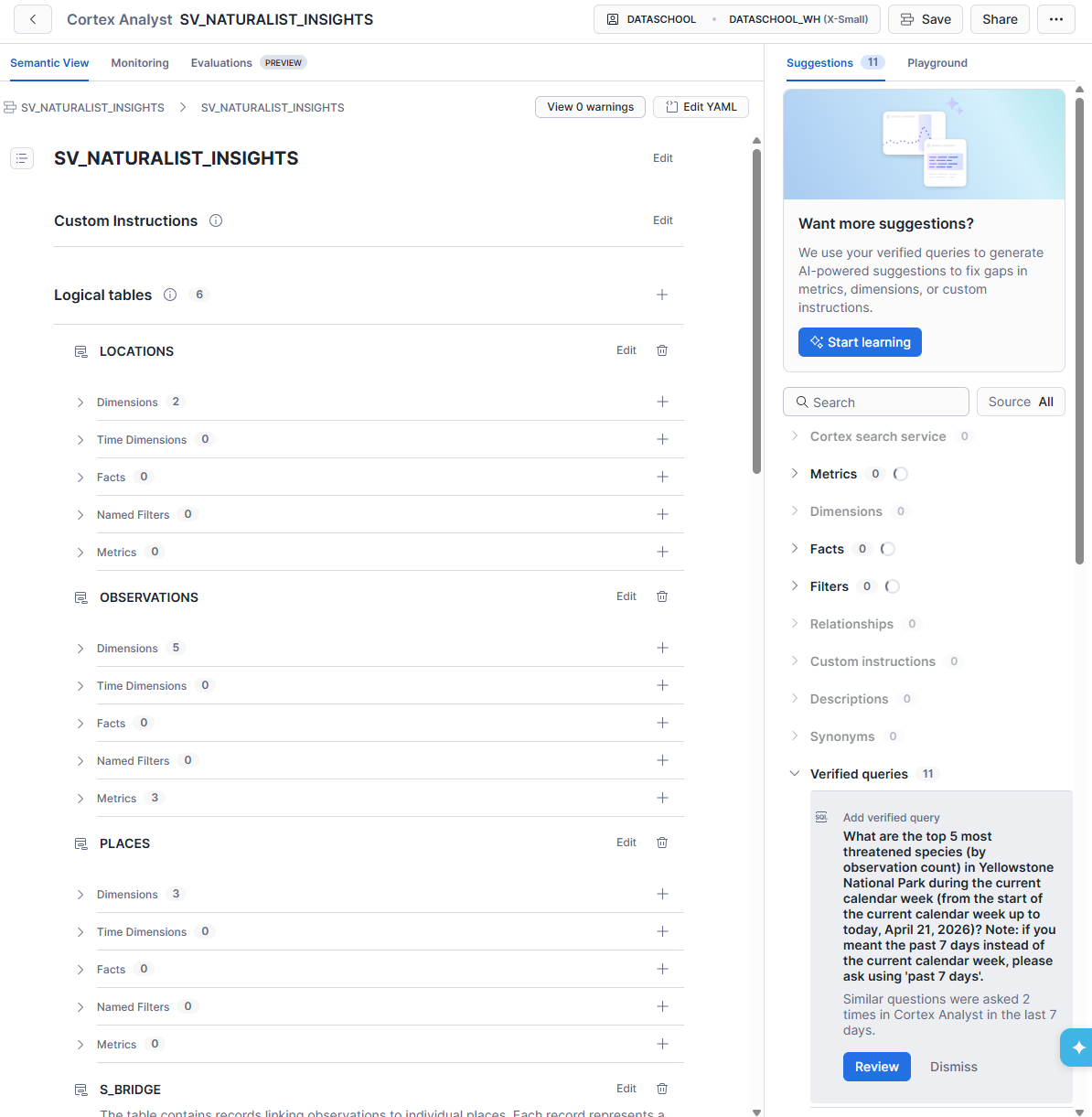
As you can see you can add more dimensions, facts, tables, relationships from here. You're also able to edit field documentation, aliases to allow the AI to recognise multiple naming conventions for a same field. This is where you should spend most time, building a robust, quality ensured, documented semantic view to permit the best AI use.
In the top right corner you can also see 'edit YAML' which allows you to do those edits allowed by the UI directly into the YAML where all of this is defined.
Then on the right side you'll have you're AI chatbot with a playground and suggestions. Within the suggestions are metrics the AI recognises but more importantly the verified queries. Those will establish a ground truth, meaning you can tell the AI these queries define these questions. These reduces the chances of the AI hallucinating logic, relationships, definitions. In the back end, these verified queries are turned into vectors with index to make it rapid and efficient for the AI to look through and to optimise having many verified queries especially for larger semantic views. The AI can then look for the most relevant queries rapidly. Just remember that validating a query and adding it to the semantic view means it runs and computes the results, with an existing cost.
With these semantic views, Snowflake sets up the future of thorough and efficient use of AI within data anlytics. Allowing teams to set up governance for the AI, making the AI more trustworthy.
In the next blog we will cover Cortex Analyst, costs and optimisation.