


How to process briefs and create user stories for your projects
What makes a good consultant?
When considering what makes a good consultant, the ability to demonstrate one's technical skill might be top-of-mind for most. This belief was definitely true for me as I began my training at the Data School, and while it still is a vital ability to possess as a consultant, I have come to realize that it shares equal importance with another ability: understanding the business needs laid before you and turning them into tangible actionables. In other words, a good consultant must be able to process a brief effectively and create clear user stories for their projects.
If you are left wondering how one might even begin to do that and for what reason they would be compelled to do so, the answer is that it depends on what you do; a business strategy or software engineer consultant's process would look slightly different compared to the process of a data analytics consultant. For the purpose of this blog, I will demonstrate the data analytics flavor of the process shortly.
As to the reason why they would need to do this, it is largely the same across the disciplines. Processing briefs and creating user stories (to be elaborated on later on) are steps 1 and 2 in the multi-step process that is necessary to take an idea and turn it into a reality. Before we create a product, we must define what we are trying to create and make out a plan. This serves multiple purposes. For you, user stories provide the roadmap and acceptance criteria for what 'done' looks like. For your client, they act as a scope agreement, ensuring that expectations are aligned before a single chart is built.
The Project Cycle
Let us zoom out for a second from the focus of this blog and look at the project cycle as a whole:
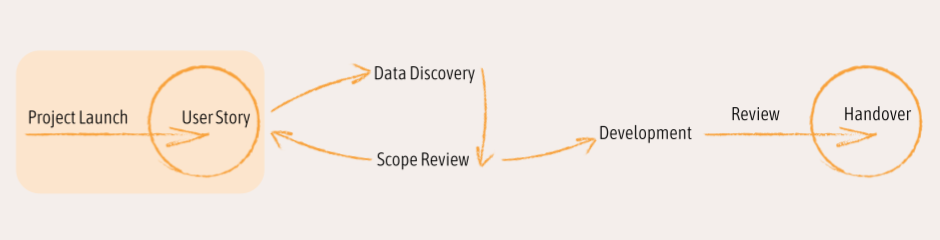
For the purposes of organized project development, we use Agile, a project development methodology that originated from the software development space, which breaks down a large project into smaller incremental components. Each component is represented by a single user story, which describes one feature of the project. Because we can split up a project into smaller, separate streams, a team can work on different features simultaneously, shortening the overall time it takes to complete that project from start to finish.
We create user stories, which are accounts of what a stakeholder would like to accomplish through the use of a product we are aiming to build and in the process of defining. We write user stories as a method of
Before we can create a user story, we need to understand the basis of our project by processing the project brief from our client.
Project Launch and Brief Processing
At the start of this cycle, our job is to gather the details of our project. We might start with a project kickoff meeting with our client. It is here that we begin asking our client questions about who they are in the context of this project, what their concerns are, why they want a data analytics solution, what they want to find out, and so on. Assume nothing! It is wise to ask as many questions as you can initially so that you are able to understand in depth the nature of your client's request. This saves you a lot of time down the line from having to go back to the drawing board because you spent time building towards a product that's out of scope.
It is your responsibility as the consultant to facilitate a conversation with your client that is conducive to a proper project setup. You would "help them help you" by questioning them in a way a doctor might a patient so that you can identify the problem that you need to address, even during times when the patient may not have the right words to articulate their need right away.
Through this conversation, you should be able to create a 'profile' with details about a 'user' of the product you are building, the tasks that user will be completing using your product, and the decisions that they need to make based on the results of using your product.
The result of the surveying step might look something like this:
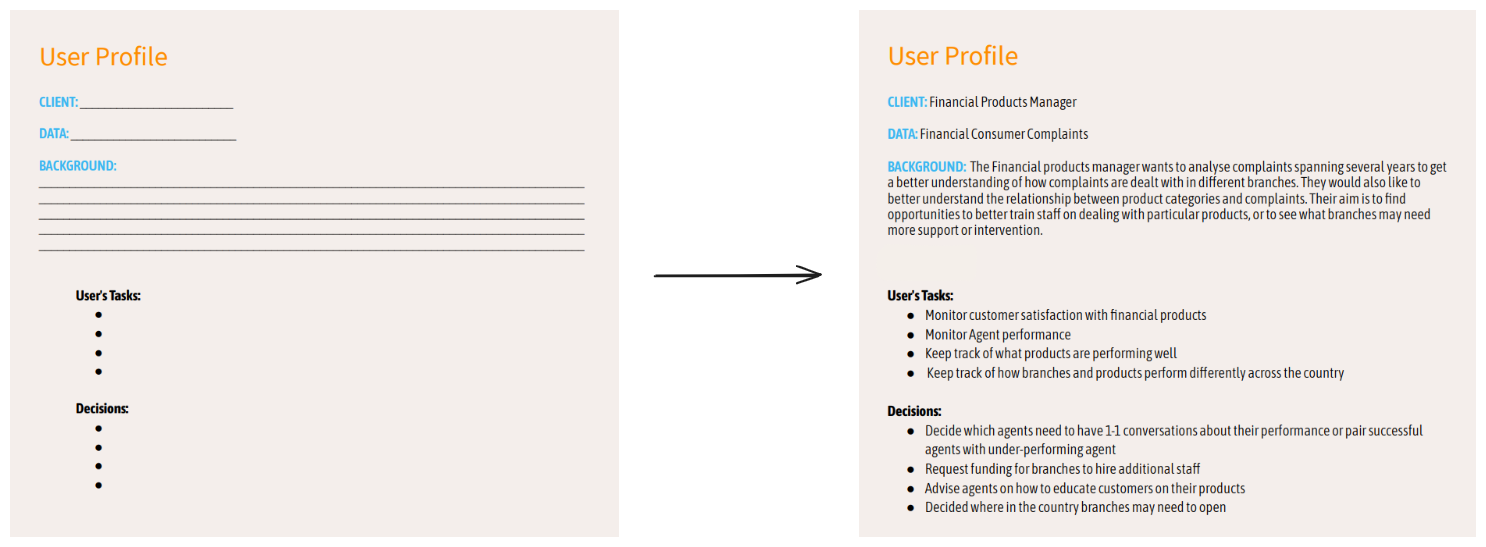
Let's look at the anatomy of a user profile.
Client:
It is, of course, important to know who your client is. You can ask something as simple as "Tell me about your role in the company. What do you do?" if they have not already volunteered this information.
Knowing your audience (your client) will help frame the way the dashboard is to be used. When thinking about what kinds of KPIs (key performance indicators) we want to see on the dashboard, knowing the client's role helps narrow down the kinds of figures and metrics that would be useful in those spots.
Data:
It is good to always have in the back of our minds an idea of the kind of data we will be working with. Do not mistake this to mean we should start 'diving' into the data.
Do ask your client what kind of data they will be giving you and, for multiple tables/files, what the purpose of each table is and (time allowing) what kinds of values they record. You might be able to briefly walk through the data with the client and ask about the meaning of certain header names. But that's it! You wouldn’t want to be wasting precious scoping time on data investigation. You will have plenty of time to do that during the data discovery phase of the project lifecycle. Everything in its time.
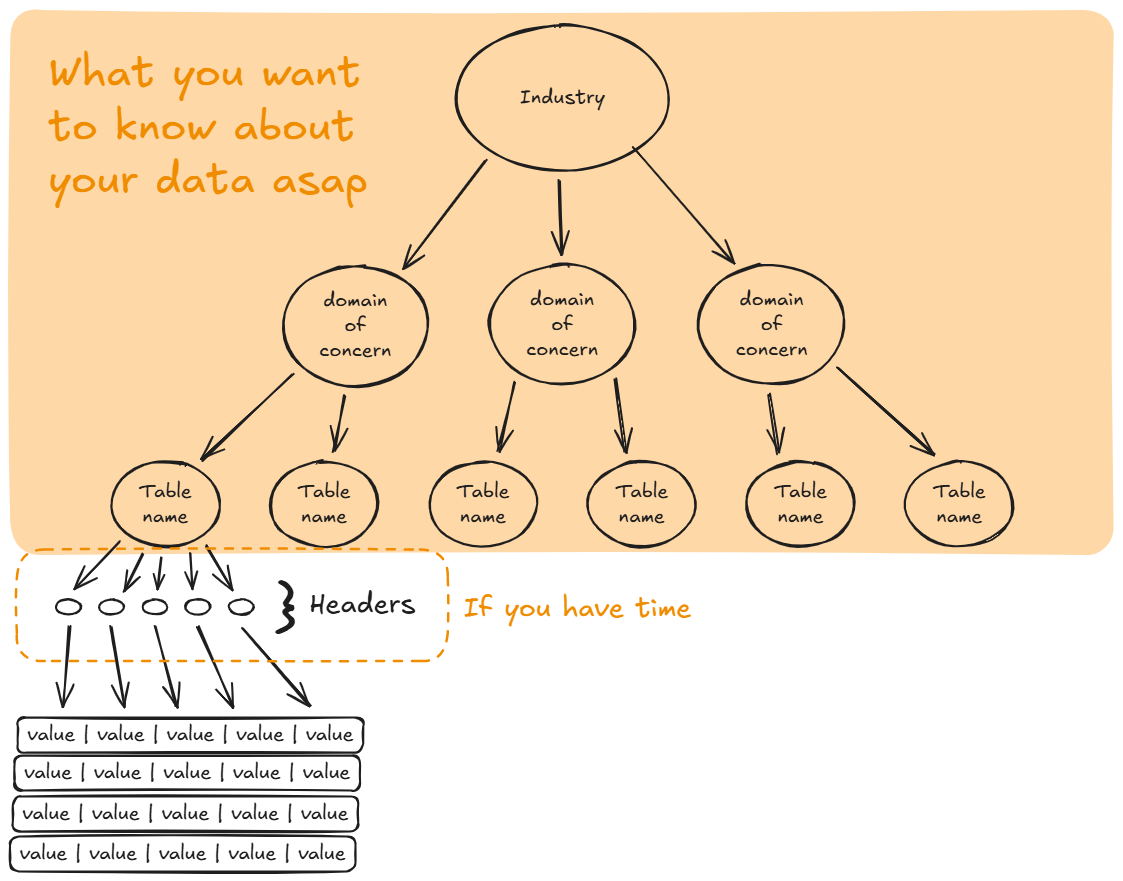
What you end up writing down in your user profile is something short that describes the data you have to work with as a kind of shorthand, but on a personal level you want to understand *what* it is that you're being given.
While true, the point of this exercise is not to commit yourself to a singular instance of a dashboard but rather to focus your path of investigation and analysis. Think of it as the data analysis version of an essay outline, which hits major requirement points.
Background:
The background will be a kind of summary of the broad goals of the project. It will provide context for the project by describing the circumstances around the client's problem and how different dimensions of the project are loosely related. Hopefully this background should mention some user tasks and key decisions in the context of the industry.
This is probably the hardest part of the entire project.
In the example above, we have some content about a fictional client with some goals and concerns. In a real setting, they won't always spell it out explicitly for you. The background of your user profile will be up to you to draft up based on the conversation you will have with the client and how well you can listen to and interpret their request.
User's Tasks & Decisions:
Let us try to extract the user task and decision from our background:
Say the client wants to analyze complaints spanning several years to get a better understanding of how complaints are dealt with in different branches.
Here "analyzing complaints spanning several years" is an action. It even suggests a time component as a lens from which the data can be viewed (perhaps a time series or year-over-year comparison?). This is the task of the dashboard user.Then what about getting a better understanding of how complaints are dealt with in different branches? This part informs us of the kind of decision that the user has to make. They would be looking at the dashboard with a question in mind, such as "How are we dealing with complaints across branches, and how well are we doing it?" They must be able to determine the answer from looking at the dashboard.
The point:
In order for our dashboard to operate in a way that makes sense, we must envision what that ideal product would look like. Being able to do that requires us, the consultants, to think like end-users. The user profile is a great way of keeping our client's interests in focus as we continue further down the project development cycle.
Now you know how to process a brief from project launch.
Creating User Stories
Now that you have processed the brief and have a handle on the nature of the project and its requirements, you can start thinking about user stories. User stories traditionally follow a format like this:

Let's examine the anatomy of the user story.
From a user profile, we can generate multiple user stories.
From a user profile, we can generate multiple user stories.
We want to first identify our user's role. It will set the overall context of our dashboard and provide a theme to adhere to when thinking about what charts to include.
Next, the part of the user story that dictates the action the user will be performing defines the kind of data that the dashboard will be displaying. This corresponds to the user's task. For example:
If the user wants to monitor customer satisfaction with financial products, then our dashboard will have to be able to display information about the kind of products being sold, the number of customers purchasing that product, the volume, frequency, and contents of customer reviews, and so on.
If the user wants to monitor agent performance, then our dashboard will have to be able to display information about how many agents we have, what we define as target or "acceptable" performance, what that performance looks like across the different dimensions of the business, and so on.
Finally, we will want to define why our user wants to use this dashboard. This corresponds to the user's decision. Perhaps they wanted to understand customer satisfaction with their products so they could "advise their agents on how to educate their customers on the company's offerings" and essentially improve the way their agents handle the marketing aspect of the job. Knowing the client's question that drives why this dashboard has to exist in the first place will make sure that we choose charts and make design choices that can lead to this question being answered.
Our completed user story might look something like this:
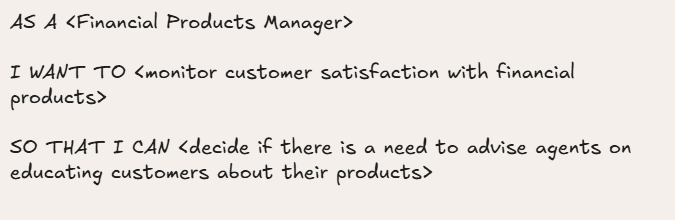
This is just one possible user story that we generated from our user profile.
What do we do from here?
After you have created some user stories, a good next step is to reconvene with your client. If all goes well and the scope of the project is agreed upon, you should be safe to move onto actual development. Sometimes during data discovery you might discover that one of your user stories isn't viable. The great thing about this process is that you can discover this early on and go back to the drawing board quickly and avoid wasting time and work. And because each story focuses on a single business need, only that one thing has to be reworked rather than having the whole project stalled.
In short, knowing how to process a brief well and create clear user stories is what elevates you from being a person who just builds dashboards to a true consultant, one who is capable of navigating ambiguity to deliver exactly what the client needs, even when they don't always know how to ask for it. These first steps in the project cycle are crucial for bringing the project from a vague idea to a successful execution that actually answers real questions and displays data in a helpful way.