


I recently spent two weeks learning Mendix, and I want to share my experience. When I started, I had no real understanding of how the platform worked. Now I have a working application and, more importantly, a much clearer mental model of low-code development.
This post is a story about how I learned, what confused me, and what finally made everything click. I hope it helps anyone who is just starting with Mendix.
⸻
Week 1 — Understanding the Basics
My first goal was simple: understand how Mendix actually works.
I went through the Mendix Academy beginner path. It consisted of:
• Build Your App Using a Template
• Build an App from an Excel Spreadsheet
• Agile Awareness
• Become a Rapid Developer
These courses are a very good guide. They don’t just show what to click — they explain the core ideas behind the platform: how the system works internally, what functionalities exist,how you can structure an application.
After finishing the Become a Rapid Developer course, I took the Rapid Developer Certification the next day. Preparing for the certification forced me to review all terminology — entities, associations, microflows, pages.
At that point, I knew the basic theory. But I also realized something important:
I had a lot of information in my head, but no real knowledge yet.
⸻
Week 2 — Building My Own App
To actually keep the knowledge, I decided to build my own project. I created a simple application: Library Management System
The app needed to:
• show an overview of books
• allow borrowing and returning a book
• store reservation and return date
• store who borrowed the book
• display a dashboard with statistics
Simple idea. Not simple execution 🙂
The Real Learning Started Here
The moment you stop following tutorials, problems begin — and that’s exactly where learning happens. Every step introduced a new challenge.
1. Importing Data.
I already had a .csv file with books and wanted to import it into my Mendix app.
This was my first real struggle — and also my first “aha” moment.
This tutorial helped me.
2. Designing the Domain Model
The next challenge is creating the domain model correctly, including:
• defining the relationships between books, users, and reservations
• storing and handling dates correctly
3. Borrow & Return Logic
I assumed the buttons would be easy—just click “Borrow” and it’s done. However, I actually had to implement real business logic, including preventing double bookings and adding validation rules.
This required a solid understanding of microflows.
4. Calculations and Metrics
Next I wanted statistics:
• how long a book is borrowed
• average reading time per book
5. Dashboard & KPIs
I struggled with:
• how to calculate KPIs
• how to prepare data for widgets
Eventually I solved it using non-persistent entities.
This was a big conceptual breakthrough for me.
6. Charts
Charts were not as intuitive as I expected. They require a good understanding of how they work.
This is a helpful tutorial that I used.
What I Want to Improve Next
My library app still isn’t finished. Next I want to:
• improve the UI design
• possibly use custom code/widgets
• implement user roles & security
• experiment more with charts and analytics
⸻
I’ll also share some useful links and resources that helped me during this journey:
• Mendix Academy
• Mendix With Me
• Mendix Docs
• Mendix Blog
And here is how my app looks.
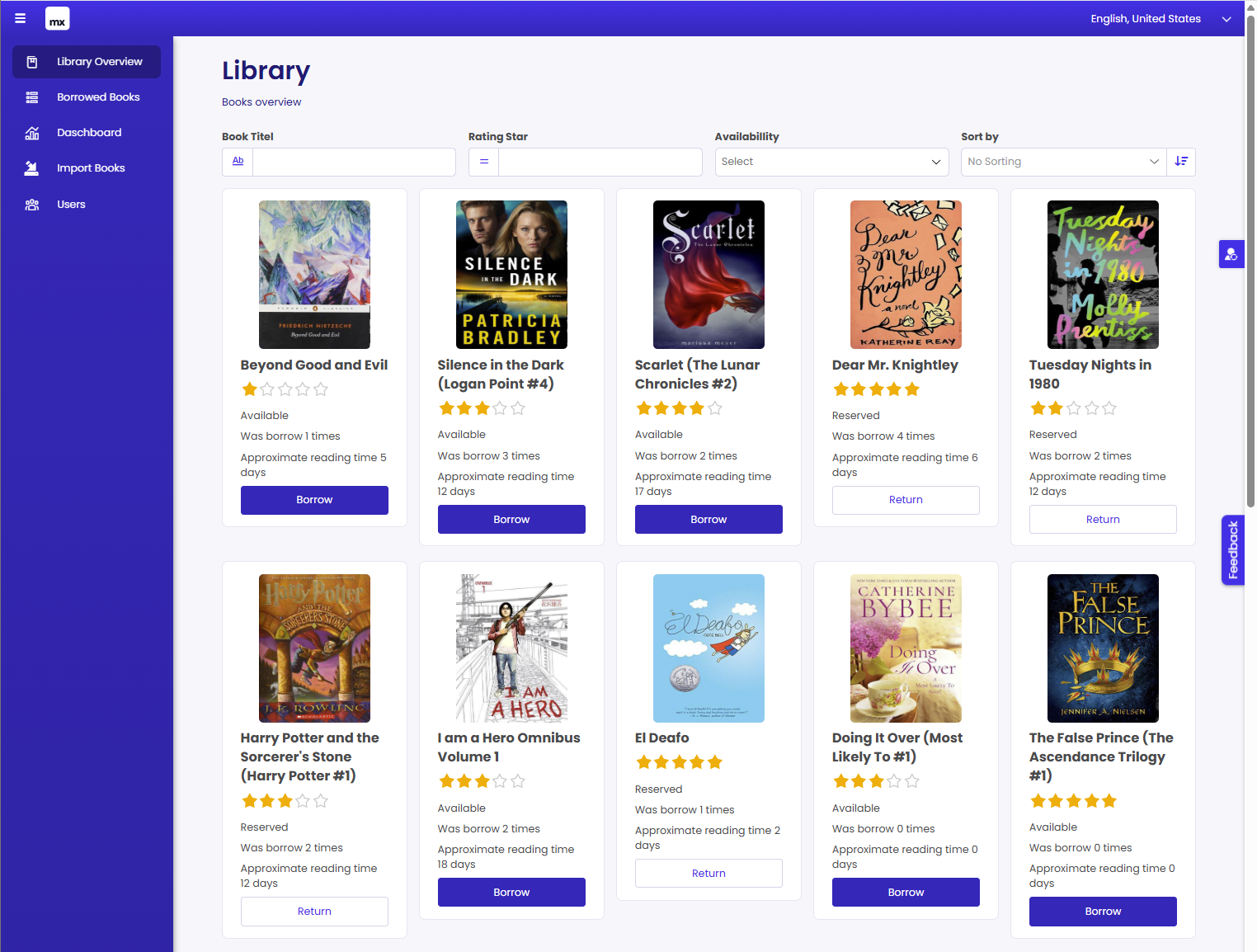
Photo by Luisa Brimble on Unsplash