


Welcome to the Tableau Next Blog Series!
In this 5-part series, I’ll walk you through the end-to-end process of working in Tableau Next — from loading data all the way to building a functional dashboard.
Looking for a summary of what Tableau Next actually is? Follow this blog: What is Tableau Next?
This blog is about using Concierge after you have built a dashboard in Tableau Next. It’s based on the latest version available in July 2025.
What We'll Cover
- What is Concierge?
- Using Concierge on an Existing Dashboard
- How is Concierge Different from Agentforce?
- Concierge Tips and Final Thoughts
What is Concierge?
Concierge is a smart, chat-based AI built into Tableau Next. It lives in the workspace and lets you ask plain-English questions about your data.

It’s deeply connected to your Semantic Model — so it understands your fields, relationships, hierarchies, and calculations.
You don’t need to build new visuals every time you want to answer a question. Just type your query and let Concierge do the work.
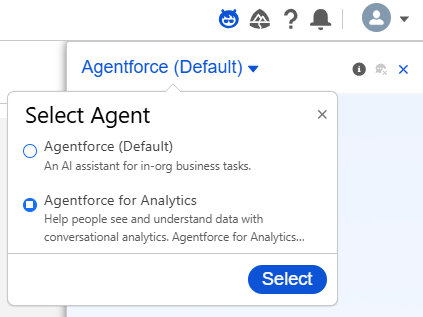
It can be found on the top right of the Toolbar. Just make sure you change Agentforce (Default) to Agentforce for Analytics
Using Concierge On an Existing Dashboard
After building a dashboard in Tableau Next, you can use Concierge to go further:
- Validate key metrics
- Break down summary KPIs
- Explore differences across segments
- Answer stakeholder questions on the fly
Let’s say your dashboard shows overall sales, top sub-categories, and YoY growth.
Try asking Concierge:
- “How did Phones perform in Q2 this year vs Q2 last year?”
- “Which segment had the lowest profit ratio in 2024?”
- “List all sub-categories with negative sales growth.”
If Concierge is is unsure about a question, rather than giving a false answer, it will ask for clarification. If it can't give you that information or you are missing fields for that answer, it will let you know.
All of this is based on your live Semantic Model, not static snapshots.
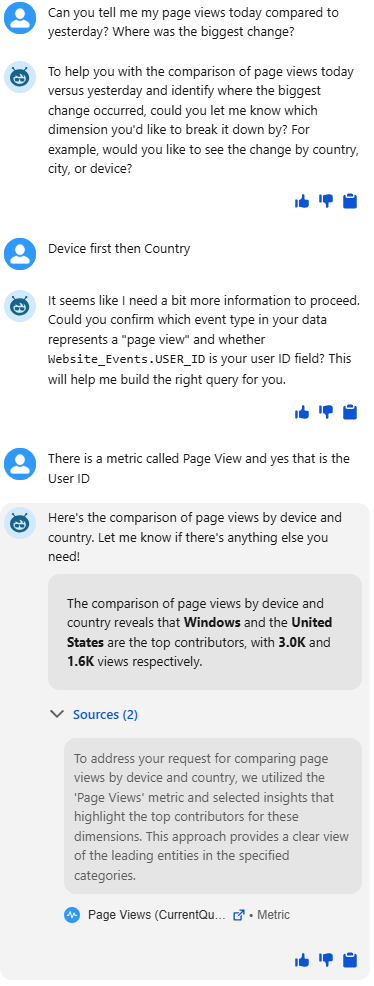
These types of questions are often raised in meetings or live reviews. Instead of going back to edit mode or switching tabs, Concierge gives you answers right there — without disrupting the flow.
Great for Stakeholders and Non-Data Users
Concierge isn’t just for data analysts — it’s a powerful tool for business users, stakeholders, and non-technical teams.
Once a dashboard is built, users can:
- Self-serve follow-up questions without editing the dashboard
- Ask for comparisons, breakdowns, or deeper insights
- Explore data naturally without knowing how to build visuals
This empowers more people in your organisation to get value from data without needing access to Tableau Desktop or dashboard edit rights.
How is Concierge Different from Agentforce?
While Agentforce helps you build new visuals, Concierge is about answering questions. Here's a quick comparison:
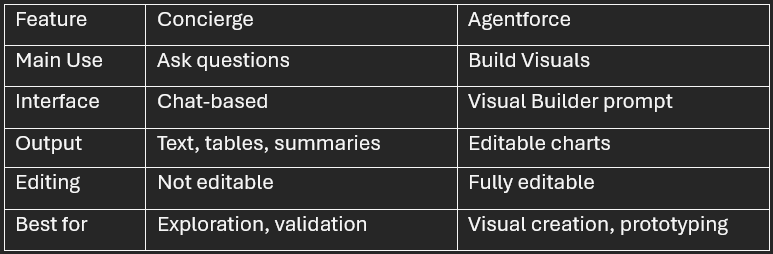
They’re complementary. Concierge is useful after the dashboard is built; Agentforce is more useful while building.
Concierge Tips and Final Thoughts
Concierge Tips
- Be specific: Include time ranges or categories in your questions.
- Use comparative language: Ask for change, rank, growth, or deltas.
- Follow up: You can keep asking deeper questions in the same thread.
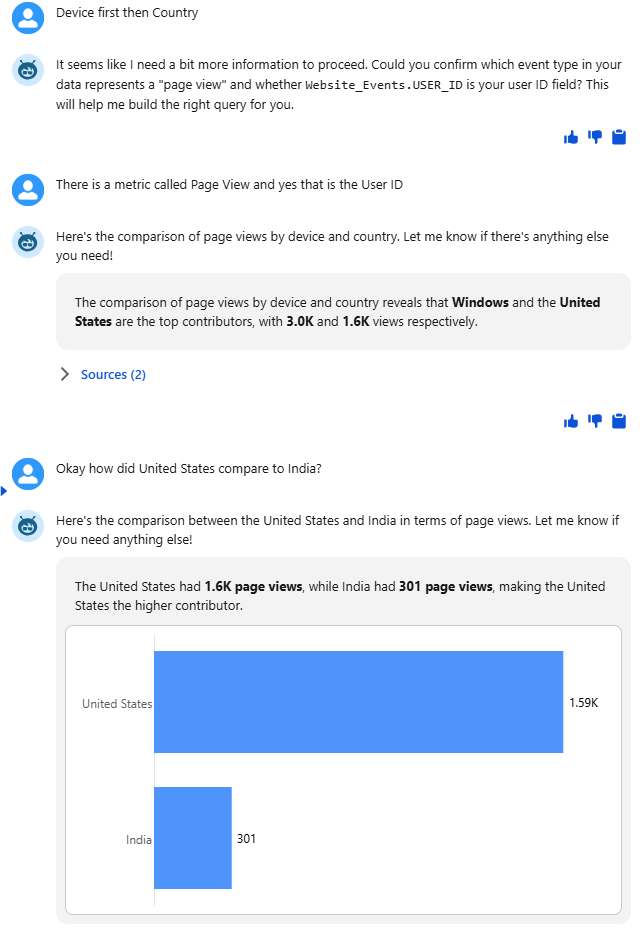
- Note: As Tableau Next is still in early release, Concierge may occasionally return with no answers — it will improve with update.
Final Thoughts
Concierge in Tableau Next gives you a powerful, intuitive way to explore data after you’ve built your dashboards. Instead of going back into edit mode, use natural language to explore and validate insights.
This makes Concierge ideal for stakeholders, reviewers, or analysts who want to understand the “why” behind the numbers — without needing full authoring rights.
You Did It!
And that’s it — That wraps up our Tableau Next 5 part blog. You now know how t0:
- Load Data From Scratch
- Build a Semantic Model
- Build Visualisations
- Build a Dashboard
- Use Concierge after building a Dashboard