


If you’ve spent any time in Tableau beyond the basics, you’ve probably heard people talk about Fixed LOD calculations with a mix of excitement and fear. When I first approached it, it was definitely fear. 🫣
But once LODs click in logically, they become one of the most powerful tools in your Tableau toolkit.
This post breaks down what Fixed LODs are, how to actually use them, and why they matter.
What Are Fixed LOD Calculations?
Fixed Level of Detail calculations let you control the granularity at which a calculation is performed, independently of what’s currently in your view.
Normally, Tableau calculates values based on:
- What dimensions are in the view
- Filters that are applied
- Aggregations (SUM, AVG, etc.)
In a way Fixed LOD calculations let you say:
“Ignore what’s going on in the view and calculate this at this level instead.”
Super Store Example
Calculating Distinct Counts at a Fixed Level
Below is a screenshot of Region, Category, and Distinct Count of Customer Name. In this view, Customer Name is being calculated at the level of detail that exists in the visualization:
Region → Category → Distinct Count of Customer
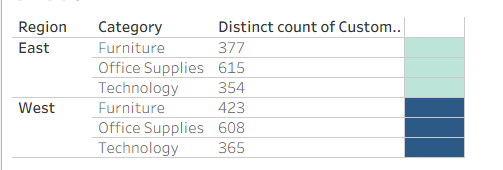
Using the color on the furthest right column, I highlighted a different calculation. Instead of counting customers at the Region → Category level, we want to calculate the distinct number of customers at the Region level only.
To do this, we can use a FIXED Level of Detail (LOD) calculation:
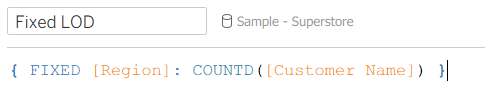
This calculation { FIXED [Region]: COUNTD([Customer Name]) } tells Tableau:
- Ignore everything else in the view, such as Category or Subcategory, and only calculate the distinct count of customers at the region level.
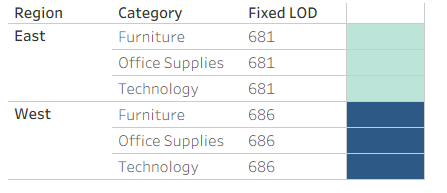
When this field is added to the visualization, the value will remain the same for every row within that region, even if additional dimensions are added to the view.
Why Fixed LODs Matter
Fixed LOD calculations let you control the level of detail where a calculation happens, even when additional dimensions are in the view.
This is different from Table Calculations, which compute values based on the data currently shown in the visualization.
Fixed LODs vs Table Calculations
LOD Calculations:
- Calculated before most filters
- Stable and reusable
- Independent of visualization layout
Table calculations:
- Calculated after the view is built
- Great for running totals and ranks
- If your calculation breaks when you rearrange the view, consider an LOD.
Understanding Order of Operations (Very Important)
LOD Calculations are affected by Tableau’s order of operations.
Key rule to remember:
- FIXED LODs come first then dimension filters
- FIXED LODs listen to context filters first
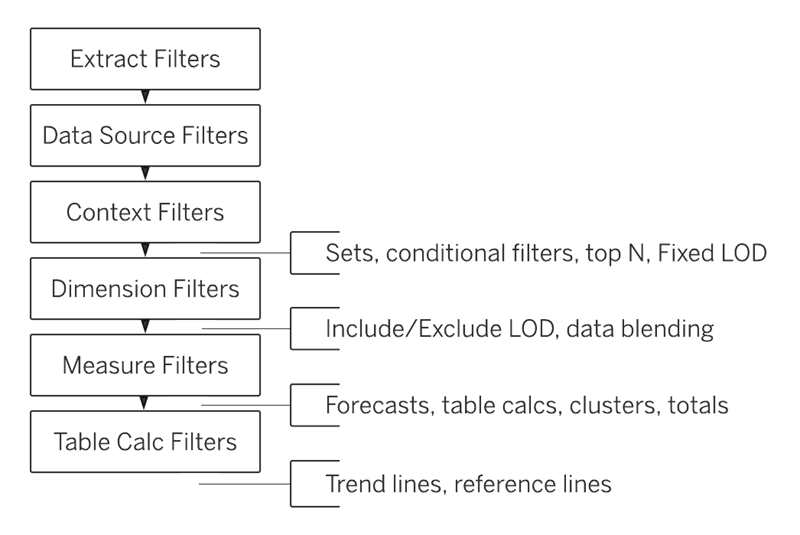
So, if your FIXED calculation isn't working as expected, then one check that can help is to see if your filters are interfering with Tableau's order of operations.
Final Thoughts
Fixed LOD Calculations aren’t magic, they’re just explicit instructions to Tableau about how detailed your calculation should be.
Once you shift from thinking "this is advanced" to "I just want this calculated at that level" , Fixed LOD calculations suddenly start to click.
Happy vizzing!