


In a few weeks, my cohort and I (along with Kib and Tyler from DS54) will be presenting two different day-long sessions here at The Information Lab in London. One is on how to use Tableau and the other is on how to use Alteryx. For that day, I've been assigned to work on the Alteryx session, specifically on the section called 'Introduction to Transformations'. For this section, there's five different tools in Alteryx that I'll be covering.
All of these tools transform your data somehow, changing the number of rows or columns in the process. In the rest of this blog, I'll be covering how each of these tools work.
Summarize
The Summarize tool is your best friend in Alteryx. It comes up a lot as it allows for you to decrease the granularity of the data, aggregating it and performing functions on the fields in aggregation. It works by compressing multiple rows together, grouping together the fields that you want to specify the level of detail of the data.
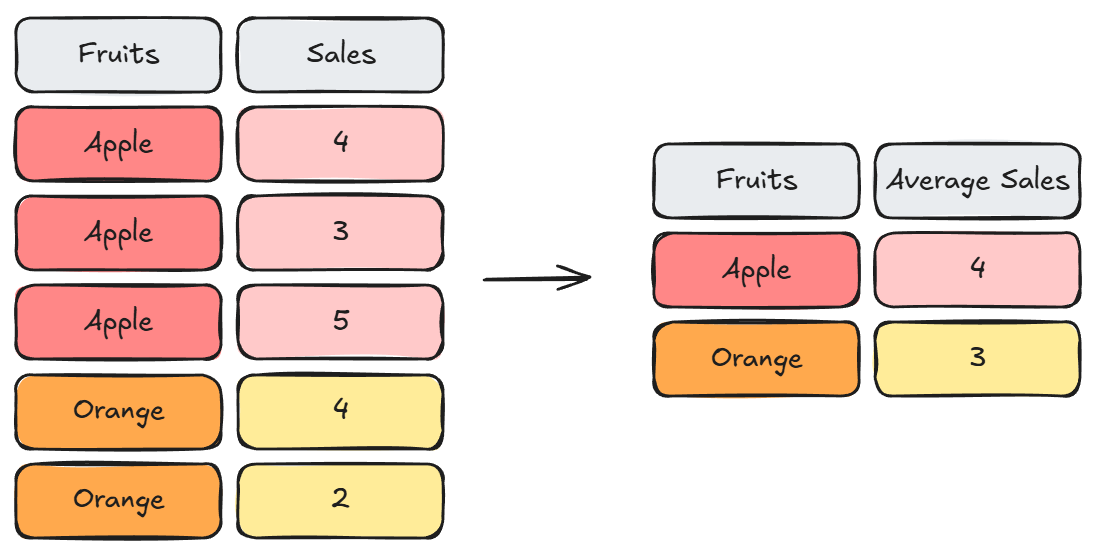
The Summarize tool starts by grouping on a field, then aggregating on something. You don't need either of them, group by or aggregation, but one is required. If you don't group, then the aggregation is performed across the whole of the data. And if you don't have an aggregation, then the unique set of values that you are grouping on is returned.
Summarizing can be useful in situation such as:
- Calculating the average sales per year.
- Count the number of different customers in a region.
- Get the highest amount of profit for each product each year.
- Find out what all the different categories of products are.
Text to Columns
Text to Columns is a useful parsing tool in Alteryx when dealing with a string field that you need to separate out. Using a delimiter, you can decide how your string is split up. The tool can also split into rows rather than just into columns. When splitting into columns, you have to determine how many columns for the string to be split into.
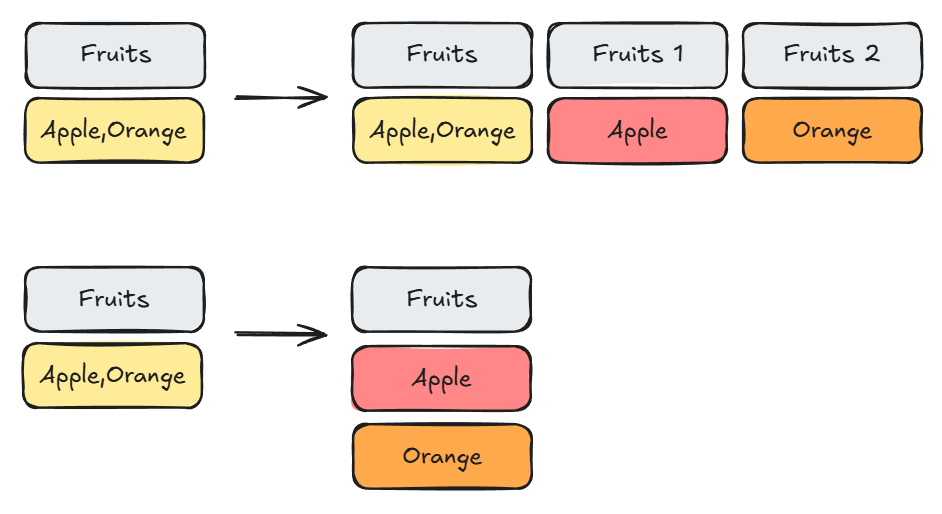
Splitting into columns can be useful when there's a format for how to split the string into, such as having a date field or a full score from a ball game. With how data is inputted, having the ability to split into columns can directly get the data you need in the format that is useable for Alteryx.
In the case of having a list as a field, especially one with a non-uniform number of items in the list, being able to split into rows allows to do analysis and work on the items in the list. An example of this is looking at the different genres of a book, where different books would have different numbers of genres associated with them.
Unions
Unions allow for data to be combined together vertically, adding new rows to the data. It 'stacks' the tables together, but this requires the tables to have a same or similar structure.
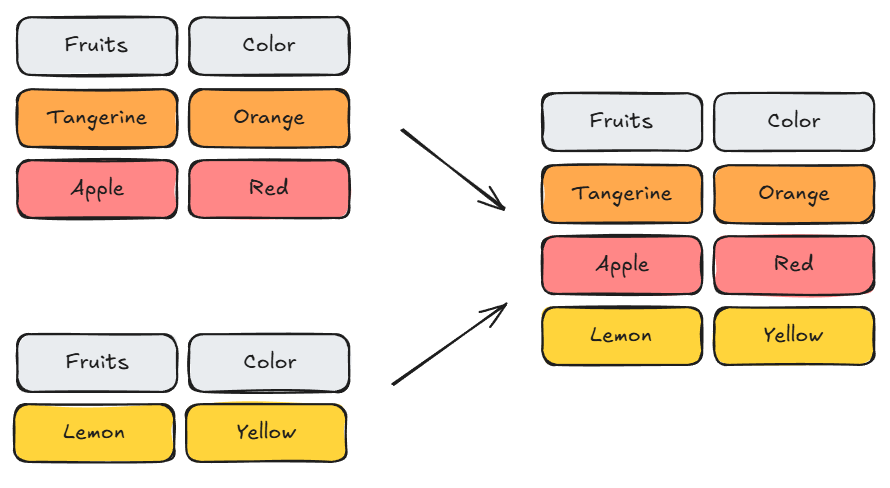
In Alteryx, there's three different ways that you can union:
- By Name: Fields with exactly the same names are combined.
- By Position: Fields with the same position are combined.
- Manual Fields: The user decides which fields are combined together.
If the fields don't align, the field is still outputted but is filled with nulls for the rows that don't match. It can also be used to get the other kinds of joins that the normal join tool doesn't do.
Joins
Joins are a very important tool when it comes to working with data. It allows us to combine data together, adding extra information to a data table. It makes the table wider, and depending on how the join is performed, can cause the size of the table to explode in size.
A join condition is needed to determine how the tables are combined together. Multiple join conditions can be provided to specify the exact values that the tables should be joined together.
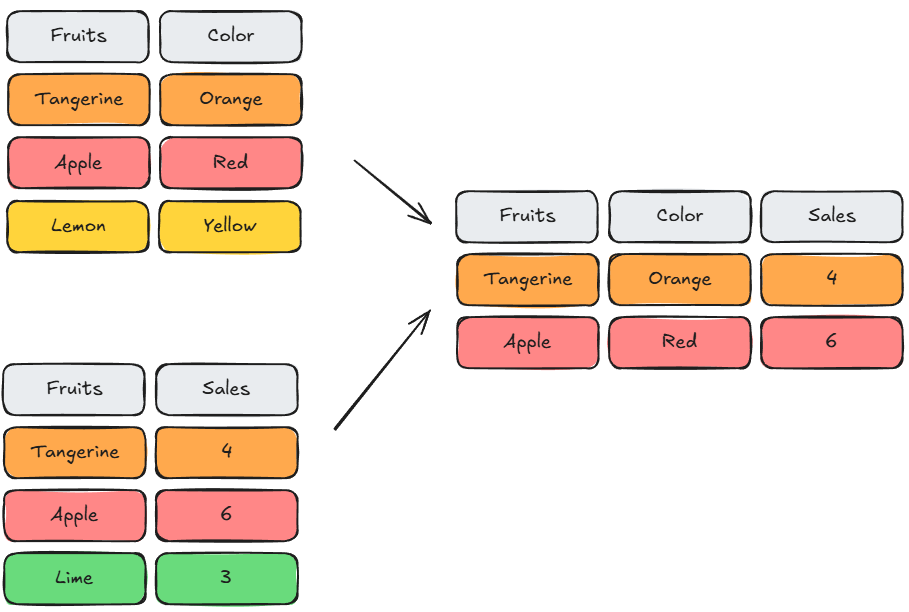
In Alteryx, you can select what fields you want to see similar to the select tool as part of the join. The result of a join is dependent on what part of the tables you want to see after they have been joined. This can be visualized similar to a Venn Diagram for what part of the data is returned by the anchors.
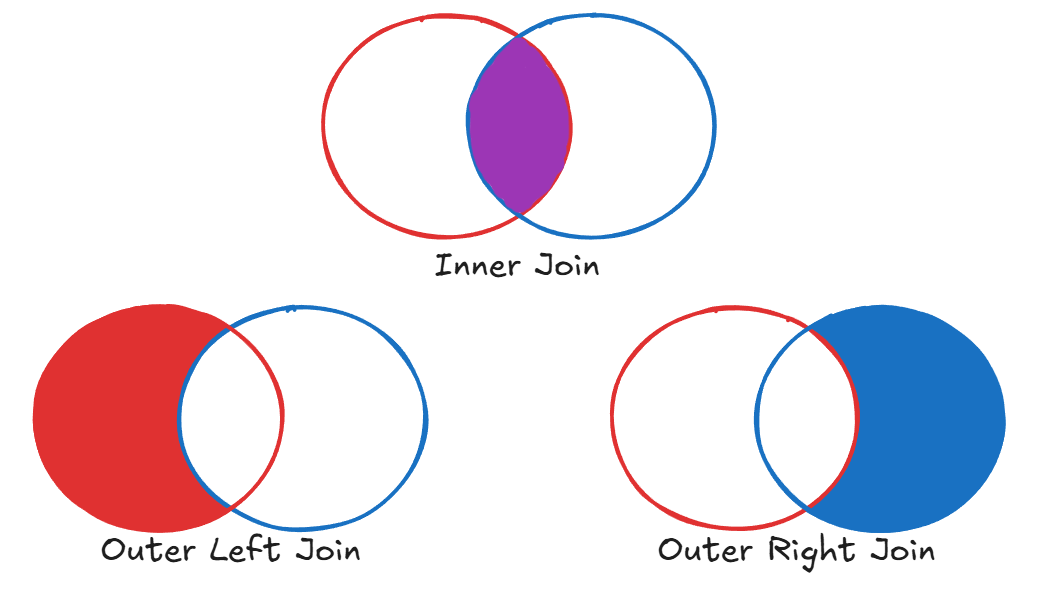
The different types of joins can be:
- Inner Join: All fields from both tables for rows where the join condition is met.
- Outer Left Join: All rows from the left side of the join that didn't meet the join condition
- Outer Right Join: All rows from the right side of the join that didn't meet the join condition.
The other kinds of joins that aren't inherit to the join tool, but can be made with an additional union are:
- Full Left Join: All rows from the left side of the join, with some rows having fields from the right side of the join. This can be done by unioning the Inner Join with the Outer Left Join by name.
- Full Right Join: All rows from the right side of the join, with some rows having fields from the left side of the join. This can be done by unioning the Inner Join with the Outer Right Join by name.
Append Fields
Appends are similar to a join in that it adds fields from one table to another. However, it isn't based on a join condition and rather adds each row in one table to each other row in the other. This can cause the size of the table to multiply in size, with the resulting size of the new table being the multiplication of the number of rows between the two input tables.
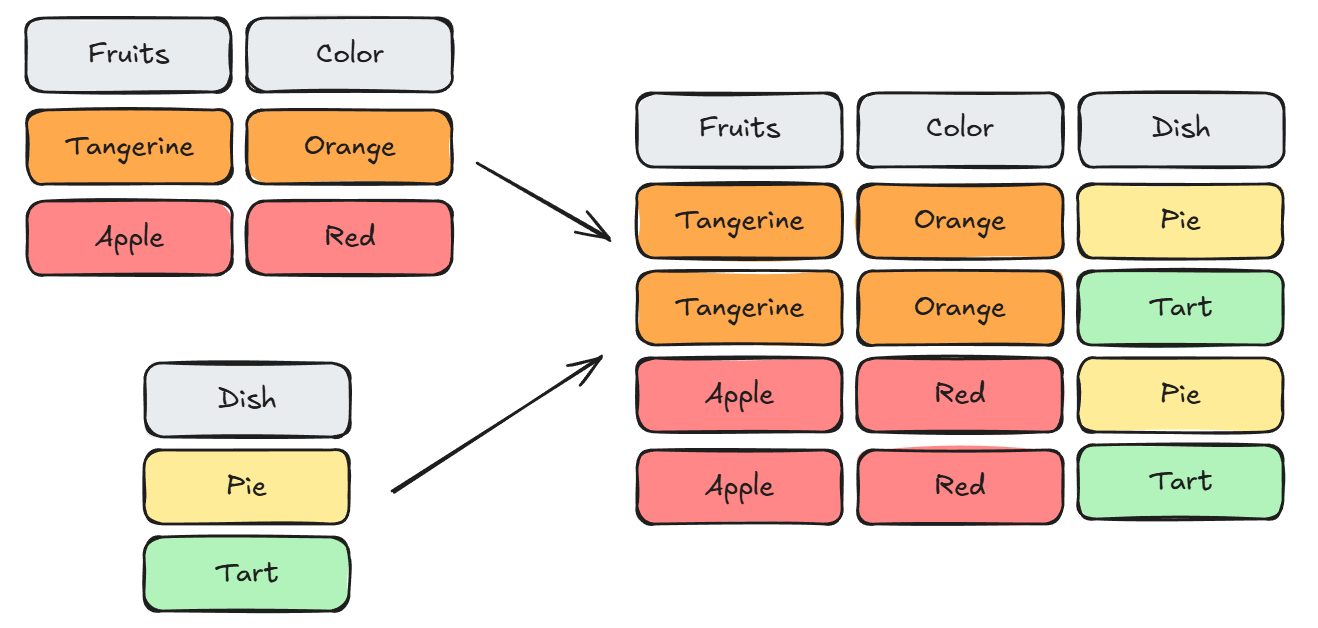
In Alteryx, the tool has a target table and a source table to appends the rows onto. This can be helpful if you need to add a piece of information to each row of the table for further changes, such as adding a total of sales to each row to find out the percentage of total sales for each row.